Discover your inside story with AncestryDNA®
Showing posts with label Digitizing Records. Show all posts

February 20, 2015

A Fascinating Look at the Digitization of Canadian WW1 CEF Files

Library and Archives Canada has posted a fascinating series of images showing their digitization process of the CEF (Canadian Expeditionary Force) service files from WW1. Each photo has a brief explanation of what that step entails. 

A Fascinating Look at the Digitization of Canadian WW1 CEF Files
Sure wish they could let us see the personal photos and letters that are found in files but apparently that is not going to happen. 

See Vault to Screen: Digitization of First World War Service Files for a glimpse of their setup and process.


March 20, 2014

Store Ledger from Maine 1922-1927 ONLINE

 Store Ledger from Maine 1922-1927 ONLINE
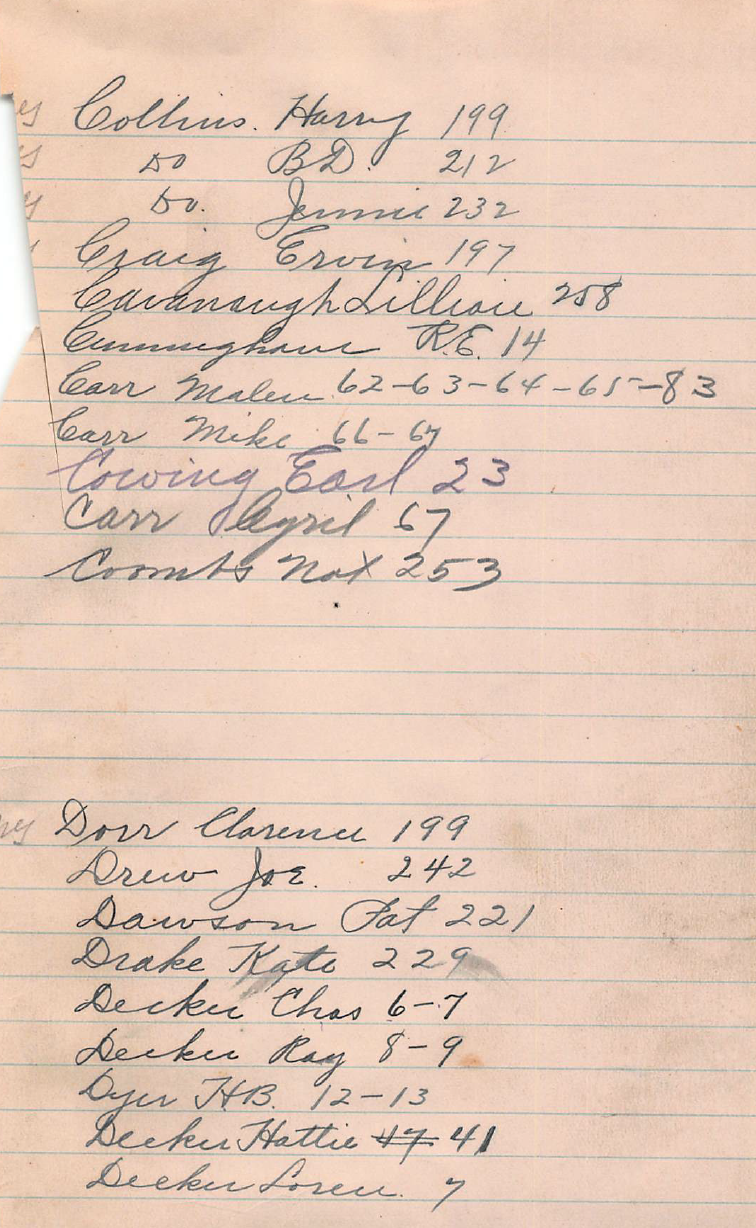
Ancestors At Rest has added another Ledger Book online. A  Store Ledger from Maine 1922-1927 is freely available as 11 pdf files. The best news is that the first file contains an index of names.

Here's a clip from the C and D indexes. The numbers beside each name refer to the page(s) in the ledger book where the entries for that individual are found.

The next helpful item is that each of the pdf files uses a consistent naming convention - that is with the number of the page in the ledger that is the start of the pdf file.  So if we want to find Decker, Chas 6-7 (from the image at the left) we have to look for the pdf file that contains pages 6 and 7.

A quick look shows that the PDF files available for download are:  Index, P. 1, P. 23, P. 43, P. 63, P. 85, P. 105, P. 123, P. 215, P. 241, P. 273

 Store Ledger from Maine 1922-1927 ONLINE
So we can see that we want to download the file called P.1. And sure enough as we scroll to pages 6 and 7 we spot the correct name. 

It looks like the Decker family needed coffee, raisins, and other assorted household items in 1923. Butter cost the household 30 cents! 

Because there is no identifying information in this ledger as to what store it was or the precise location, I searched for several of the individuals found in the index.

Of the 6 people I searched for in the 1920 census on Ancestry.com, I found 4 of them living in Penobscot Maine.

March 18, 2014

S. R. Turley 1896 Ledger Book, Culpeper Virginia ONLINE

S. R. Turley 1896 Ledger Book, Culpeper Virginia ONLINE
Great news. The S. R. Turley Ledger Book from Culpeper Virginia for the year 1896 is now online and available for download as a PDF file. There are 5 files total on the Ancestors At Rest website.

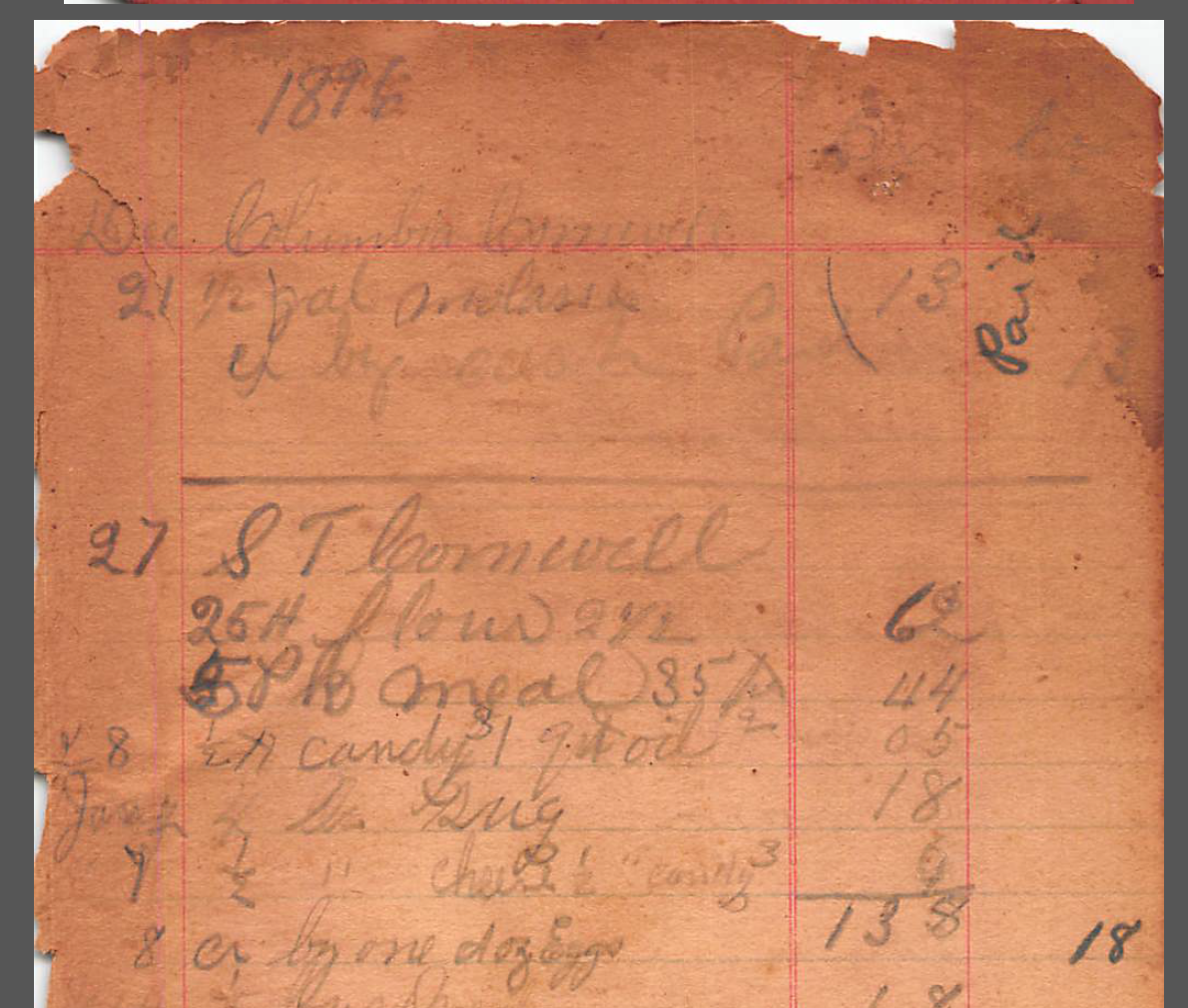
There are many names of customers in this one-of-a-kind ledger book. Each page has a customer name and the list of items purchased that year plus the cost. Some customers have more than one page of items. It's very interesting to see what food cost in 1896 and what an ancestor was buying!

S. T. Cornwell in the image on the left, bought eggs, candy, oil, flour, socks, shoes and more. One pair of shoes cost $1.15 that year.

S. R. Turley 1896 Ledger Book, Culpeper Virginia ONLINE
In some cases, one page has several customer names on it, such as the page on the right. If your ancestor lived in Culpeper Virginia in 1896 there's a good chance you will find his or her name in this gem.

I had a quick look for some of these names and found several of them living in Prince William County, Virginia. It seems Mr. Turley was a very bad speller as many seem to be phonetic representations of the person's name.

For example there is a "Page Bumery" buying laundry and gloves on one page. However his real name  is Page Bumbery. We also see "Tasker Fisher" and "Georgiana Fisher" A search of the 1900 census shows a black man Tasker Fisher and his wife Georgia in Prince William County, Virginia. 

All pdf file downloads are freely available. Brian is scanning adding the ledger books he owns as quickly as he can, so be sure to keep checking on Ancestors At Rest for updates


February 4, 2014

FamilySearch Works to Put the World’s Historical Records Online in One Generation

FamilySearch Works to Put the World’s Historical Records Online in One Generation

FamilySearch Works to Put the World’s Historical Records Online in One Generation
See Related Infographic
SALT LAKE CITY, UTAH—FamilySearch International (online at FamilySearch.org) is leading the way in digitizing and providing access to billions of historical genealogical records by collaborating with commercial family history companies and the online community. This collaboration will carve centuries off the time needed to increase access to the world’s historical records, enabling millions more people to quickly discover, share, and preserve family memories for generations.

Recent announcements of agreements with commercial family history companies are some of the first installments in fulfilling FamilySearch’s desire to remove the traditional barriers to genealogical research. FamilySearch CEO, Dennis Brimhall, explains that joining forces with other organizations, where possible, brings significantly more financial investment and technological resources to the family history industry than the nonprofit community could provide on its own.

FamilySearch plans to collaborate on digitization projects with commercial family history companies to publish new historical records collections on FamilySearch.org that have never seen the light of the Internet. Working with individual industry leaders such as Ancestry.com , Archives.com, findmypast, Fold3, and MyHeritage will also increase and broaden access to the records FamilySearch has already published online. FamilySearch plans to involve many other interested organizations that will provide records, tools, and other resources to allow more people to build, preserve, and share their family trees online.

In a keynote address at the RootsTech 2013 conference, Brimhall shared FamilySearch’s vision to empower people globally to share their family memories and save them for future generations. “Imagine if your ancestors had easy access to computers, digital cameras, and family history websites that allowed them to upload, preserve, and share important family memories through photos, stories, and vital names, dates, and places? How amazing would that be?” Brimhall said.

FamilySearch and its predecessors have been preserving and providing access to the world’s family history records for over 100 years. FamilySearch volunteers have indexed just over three billion records in extraction and online indexing projects, but they have only scratched the surface.
“For the top countries with the highest online research demand, using our existing resources and volunteers, it will take up to 300 years to index the 5.3 billion records that we already have,” Brimhall noted. “That means you and me and the next 10 generations of our posterity would not live to personally benefit from them. And there are another 60 billion records that still need to be digitally preserved. We can do significantly better by working together with other organizations and as a community.”

As new historical record collections are published under the latest agreements with FamilySearch’s affiliates, they will be available on FamilySearch.org and for free on Ancestry.com, findmypast.com, or MyHeritage.com to members of The Church of Jesus Christ of Latter-day Saints. FamilySearch offers free public access to Ancestry.com and findmypast.com through 4,715 local FamilySearch-owned family history centers worldwide. Additional details regarding expanded records access will be announced sometime in 2014, when they are available.

Infographic: Putting the World’s Historical Records Online in One Generation

January 29, 2014

LAC to Digitize WW 1 Military Records But Is it All Good?

LAC to Digitize WW 1 Military Records But Is it All Good?
From personal collection of Lorine McGinnis Schulze
This year, 2014, is the commemorative 100 year anniversary of the start of World War 1. Library and Archives Canada recently announced it plans to digitize 640,000 First World War Service Files. These are the stored files for soldiers and nurses in the First World War’s Canadian Expeditionary Force (CEF)

This all sounds wonderful! And it is. It will be a tremendous boon to genealogists to have access to these military files. However there are a few drawbacks. LAC will temporarily close portions of the service files while they are being digitized. The first quarter, beginning with the letter A through D, will be closed as of March 2014 and will be available on-line as of Summer 2014.

Quoting from the Library and Archives Canada Blog 

"The files to be digitized will complement the approximately 13,500 service files and the more than 620,000 attestation papers already available on LAC’s website. At the end of the project, expected in 2015, Canadians will be able to research high-quality digital copies of the 640,000 newly digitized service files from the comfort of their own home and will no longer have to pay reprography fees."
LAC to Digitize WW 1 Military Records But Is it All Good?
From personal collection
Lorine McGinnis Schulze
Do you spot anything in this quote that doesn't seem quite right? It is the fact that the project is due for completion in 2015. This means that for much of 2014, the commemorative year, the service files of soldiers will not be accessible! Since 2014 is the 100 year commemorative year, it instantly leaps to mind to question as to why LAC did not start this project much sooner so it would be completed in time for the 100 year anniversary. 

It seems to me that 2014 is the year that many new genealogists, authors and historians will be wanting to access the records of their military ancestors and heroes. I am quite sure there will be a lot of publicity over this 100 year anniversary and can only imagine the disappointment that will arise with the record access restricted or curtailed. 

Read the full story at Library and Archives Canada to Digitize 640,000 First World War Service Files

November 12, 2013

My Latest Toy - the Fujitsu ScanSnap iX500 Scanner

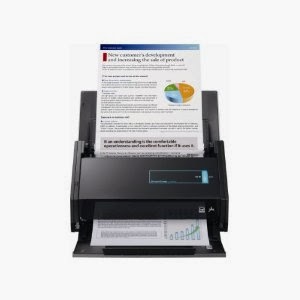
My Latest Toy - the Fijitsu ScanSnap iX500 Scanner This is my latest toy - a Fujitsu ScanSnap iX500. It's an automatic document feeder scanner and what makes it special is these abilities:
  • Can connect iX500 to computer via Wi-Fi
  • Can forward scanned data to a mobile device via Wi-Fi
  • Scans to Evernote, Google Docs and Dropbox
  • Scans in duplex
It comes with some bundled software and works with both Mac and Windows computers. It will scan up to 600 dpi in colour or greyscale and 1200 dpi in black and white if you need the best quality resolution but at the lesser dpi it is crystal clear.

Most sizes are recognized and easily scanned - business cards, postcards, letters, legal size paper, letter size paper, receipts of all sizes, etc

If you use the included Carrier Sheet you can also scan fragile items such as photographs or oversize items. I haven't tried this yet but I plan to!

You can connect to your computer via WiFi or a USB port. When scanning you can insert 25 pages at one time into the feeder, press the scan button and in seconds the scans are on your computer. Then you choose where/how you want the file(s) to go - to a folder convert to a searchable PDF file, to email, to a mobile device, to Evernote, to Google Docs or to Dropbox. It is super easy and fast to set up and I am having a wonderful time scanning items and sending them to various locations.

So far I've scanned receipts and other personal papers. My next goal is to scan genealogy documents and other miscellaneous records. Going completely paperless will not be possible but I do plan on reducing our paper clutter as much as possible.  The ScanSnap is going to aid me in that goal.

I am also going to scan the original ledger books that my husband and I have collected over the years. We had intended to transcribe the pages and put them on his website Ancestors At Rest, but the task has proven too overwhelming. 


3rd basket of discarded papers in 2 days
Rather than have the books sit in our basement gathering dust and probably be thrown out at some point, we are going to carefully cut the pages out and scan them as searchable PDF files, then upload those files to the website. That way other genealogists and descendants will be able to access these one-of-a-kind books.

We feel no need to preserve the actual physical integrity of these old ledger books as the important part is to make the contents accessible. And we do not have the physical space to continue storing the books, some of which are quite large (and heavy)

You can get Fujitsu ScanSnap iX500 Scanner for PC and Mac (PA03656-B005) at Amazon.com or any of the big stores but Amazon seems to sell it cheaper than many others. In fact right now it is on sale for $409.99

This does not replace my flatbed scanner or my beloved Flip-Pal Mobile Scanner. They are different tools for different purposes.

August 30, 2013

Heir & Devisee Commission 1797-1854 on Canadiana.org - Listing Errors and a Workaround

Heir & Devisee Commission 1777-1854 on Canadiana.org - Some Problems and a Workaround
Sample page V 89 Heir & Devisee Commission
For those searching ancestors in Canada, Canadiana.org has some great digital images of miscellaneous databases online. One of these is the overlooked but valuable Heir & Devisee Commission papers 1797-1854, found in their Heritage Collection.

Quoting from their website "In 1797, the government of Upper Canada (now Ontario) established the Heir and Devisee Commission. Its purpose was to clarify land titles for settlers on unpatented land. If your ancestor was living in Upper Canada around this time, there is a chance that you might find them referenced in this collection. Records can include: affidavits, bonds, location certificates, powers of attorney, orders-in-council, copies of wills, mortgages, deeds of sale, and testimonial letters." [Source: http://heritage.canadiana.ca/?usrlang=en]

This digitized but unindexed collection consists of 21 microfilm reels. The reels contain various volumes of the Heir & Devisee Commission papers, starting from Volume 1 to Volume 104. Canadiana.org provides a list of each microfilm and what volume numbers are included, plus a very brief description of what is contained in the volumes. For example, the first microfilm H 1143 contains Volumes 1 to 6. Volume 5, as an example, is said to contain Notices of claims, received but disallowed or unresolved, arranged alphabetically for the Eastern District ca 1809-1841.

This is very useful to the researcher as we can narrow our browsing to those microfilms of interest to us. It's still a long task as there are no indexes and each Volume is arranged differently. Some are alphabetical, some are by district and so on.  But this listing of microfilms with volumes contained narrows our search. Each microfilm has been digitized and is available for immediate browsing.

Typical Cover Page Found in Some Films
Unfortunately Canadiana.org's listings are incorrect, as is their main title "Heir and Devisee Commission, 1777-1854". The correct dates are 1797-1854. I discovered the incorrect listings in the online Finding Aid accidentally by searching for a specific time period in a specific location. Using the list of microfilms with contents, I chose the appropriate images.  But as I scrolled through I realized something was wrong. I seemed to be looking at documents for the Johnston District, not Niagara area. Then I came across what I call a cover page - a typewritten sheet stating what Volume number I was about to view and a description of what images came next. But the volume number was wrong and should not have been on that particular microfilm according to the list provided by Canadiana.org.

Long story short, I began a methodical (slow!) search of every microfilm that has been digitized and placed online. Of the 21 microfilms, 10 are incorrectly identified as to volume numbers and content contained. 

To assist other genealogists and researchers, I am providing my correctly identified contents of each microfilm. It took me over a week to do this and I am happy to share it with others. I will be contacting Canadiana.org to advise them of the errors.

I will also be providing a list of where each volume starts within each film. That is, I will provide image numbers for each volume buried in the films so that researchers can quickly and easily jump to the volume of interest.  This project is underway and I have most of the films completed with only a few more to look through. So watch this blog and my website Olive Tree Genealogy on the Ontario Land Records section for the completed list. See the Heir & Devisee Commission page for updates 

And now - here is the corrected list of Heir & Devisee Commission microfilms and volumes contained within each compared to the Canadiana.org list. Those in red are incorrectly labelled and identified on Canadiana.org. For those microfilms with no cover pages indicating Volume Numbers, I compared page numbers at the start and the end of each film to determine what volume(s) were in each film.


Film # Candiana.org Volume list Actual Volumes
H 1133 V 1-6 V 1-6
H 1134 V 6-8 V 6-8
H 1135 V  9-15 V 16-20
H 1136 V 16-20 No V# labels but is V 20-24
H 1137 V 20-24 No V# labels but is V 24-28
H 1138 V 24-28 No V# labels but is V 28-32
H 1139 V 28-32 V 33-37
H 1140 V 33-37 V 38-44
H 1141 V 37-44 V 45-46
H 1142 V 46-51 V 9-15
H 1143 V 51-54 No V# labels but it is V 51-54
H 1144 V 54-63 No V# labels at start but V 56-62 labelled. This is V 54-63
H 1145 V 64-73 V 64-73
H 1146 V 74-78 V 74-78
H 1147 V 78-80 V 78-80
H 1148 V 81-83 V 81-83
H 1149 V 84-86 V 84-86
H 1150 V 87-89 V 90-98
H 1151 V 90-98 V 86-89
H 1152 V 99-103 V 99-103
H 1153 V 103-104 V 103-104


Stay tuned for more details on each film and what it contains plus image numbers to jump to the different volumes within each.


April 19, 2012

Scanning Auntie's Life Story Pages with Flip-Pal Mobile Scanner

Using LiveScribe to Record Auntie's Memories
Here's another way I got to use my Flip-Pal Mobile Scanner with Auntie. We usually chat and drink tea while I scan her box of photos.

This time I recorded some of her memories using my LiveScribe Pen and then I used my Flip-Pal Mobile Scanner to scan the start of her life story she'd written out on loose pages.

You can see the pages she'd written sitting on the coffee table waiting to be scanned. The stitching software with Flip-Pal allowed me to easily scan the pages in sections then stitch them together seamlessly when I got home.

All I did was transfer the scanned sections to my computer and let the stitching software do the work putting them together in one seamless page after the other.

Journal for Auntie's Memorie
I also bought a small journal for Auntie to write down more life stories as she thinks of them. I'm looking forward to visiting again to see what else she's remembered. I'll take my Flip-Pal Mobile Scanner with me of course to scan any memories she has done. 
Scanning Auntie's Photos with Flip-Pal

If you don't have one of these amazing scanners yet there's a good deal right now that might interest you.

Use Promotion Code: FPDC412A

Coupon is good from April 18 – 29

Offer: Save $20 when you purchase a Flip-Pal Mobile Scanner plus a Deluxe Flip-Pal mobile scanner Carry Case with Pocket! (Both items must be in your shopping cart!) Use this link Flip-Pal Mobile Scannerto make your purchase

April 13, 2012

A Big Genealogy Re-Organization Starts Today!

Today's the start of an exciting project. Because my husband received so much antique furniture, china and collectibles from his grandmother Kak's home, we need more room. We already have a house full of furniture and our own antique collections. An addition is out of the question so I'm giving up my 16x20 office.

I'm downsizing from that big room that I've used for the past 15 years to our much smaller 12x15 loft room. That's not a sad decision, it's an opportunity to make big changes and purge and organize my paper files! That's always been a hard thing for me to do. I'm a paper saver. Yes. I love paper files. I've digitized about 50%, but I always want my paper backups.

Downsizing is Tricky

Some of my current filing cabinets
But not only is the loft smaller, it has slanted ceilings and only 3 walls. Because one wall is railing where the loft overlooks our cathedral living room. So I don't have room for the tall credenza and two tall bookcases that I currently use.

Because the loft is chopped up with a dormer at one end and a small powder room at the other, I don't have a lot of wall space. And there is only one full height wall. So no room for my two lateral 3' long filing cabinets, and my rolling antique dentist unit that I use for office materials, or my pine harvest table that currently holds my hanging files or.... well you get the picture!

I am going to have to weed down to 3/4 of my current desk (hubs has to figure out how to make an l-shaped desk out of a u-shaped one), my credenza and one lateral filing cabinet. Oh yeah and one bookcase.

So all my files have to fit into the credenza or one filing cabinet. A challenge to be sure! I am going to have to purge like crazy. The one bonus is that I can put my second lateral filing cabinet in the basement for overflow. Phew. 

Hanging File folders on harvest table and one bookcase
Today's the day I begin sorting and organizing and purging. I'm anxious about it but a big part of me is looking forward to it. It's spring. It's a new beginning. And the pot of gold at the end is an entertainment/family room full of Kak's bequests mixed in with our own furniture that we've been cramming into whatever space we could find elsewhere in the house.

Figuring Out a Working System

I've got a bit of an idea for a working system to start the process. I figure I'll sort first into business vs genealogy vs personal. Three basic "piles". Business vs personal is easy - anything older than 7 years gets shredded. The rest gets organized into categories, labelled if needed and only the current year stays in my files. Older years go into a large envelope, labelled by year and taken to basement storage.

This will be a flexible system, and I'll change it as needed. 

Sorting Genealogy Papers

Genealogy is the hard one for me!  I'll start by sorting papers by the following criteria and then decide what goes to the loft and what has to go to the basement:

1. my personal genealogy
2. client work
3. research for family history books I'm writing or planning/hoping to write

That means I finally have to steel myself to toss the photocopies of French documents I used to write my first Van Slyke history book. That's a pile of papers at least 3 feet high. Maybe higher.

That means I have to throw out the copies I've keep of documents about various family lines that aren't mine. You know, the ones you keep "in case". In case some other genealogist ever asks you about that family. In case you one day find out you are related. I'm taking the plunge, after 25 years with me I don't think I need them taking up space in my home anymore. That's going to be tough to do.

But perhaps I'll finally be able to proudly proclaim that I have indeed organized my genealogy!


November 18, 2011

BlogTalkRadio: Celebrate Your Family in Film (Yes I'm one of the guests!)

Don't miss tonight's Celebrate Your Family in Film on BlogTalkRadio. Yours truly is one of Thomas' guests! I'm so excited to be on, and to have a chance to listen to the other guests who are on tonight.

Special guests will include: David Adelman, founder of Reel Tributes and Rebecca Whitman Koford, Reel Tributes’s Director of Genealogy who will tell us how their company can help you create a documentary film starring your family!

Lorine McGinnis Schulze of the Olive Tree Genealogy website will discuss her recent project involving conversion of old home movies and videos to digital formats.

And Paula Hinkel of the Southern California Genealogical Society will give us a “sneak preview” of the SCGS Jamboree in June 2012 with the theme “Lights, Cameras, Ancestors!

November 5, 2011

Still Converting Old Home Movies: Ripping a DVD to .avi for Windows

Last week I began the next step of my project to convert my old VHS tape Home Movies to DVD and then from DVD to computer digital files. It's going well!

There was a lot of trial and error, gritting of teeth, mumbling under my breath and yes, outright yelling at my computer. That never helps but it makes me feel better.

But I've done it. I've converted 13 VHS Home Movies from 1983 to 1992 and put them on DVDs. I'm in the process of ripping those DVDs (yes it's called "ripping") and then converting them to digital files I can open in a Movie Maker program where I can edit, clip and create new movies from the old!

My first step was to find out what I needed to do this conversion to digital computer files that Windows could open. DVD files are in .vob format and they must be converted to something Windows can work with - such as .mpeg or .avi. There are other formats but I decided to go with .avi.

I found out that everyone has their favourite ripper! So I read reviews and several were listed as being excellent. I opted to download the free "MyVideoConverter" and try that. It worked great - fast and easy but.... (yes there was a "but") the free version has an ad for MyVideoConverter that flashes on top of your movie every 10 seconds! It was horrible.

But there was an easy solution - I registered the program by paying for it. Yes it's a bit pricey at $40.00 but I'm so happy with it that I don't mind.

Here's how I did my conversions:

Step 1: Put your DVD into your DVD player and open the MyVideoConverter program. Click on FILE then CONVERT DVD.  You will be prompted for such things as where you want the converted file, what name you want to give it, and so on.

It's going to start ripping your DVD now. It will show as a file in the window with a small red square when it's ready for the next step.

Step 2: Click FILE then START CONVERSION.

I let everything go to default except for the file name which I changed on every one to "Schulze_Home_Movies_xxx" where xxx was my designation re tape #, year, etc. I made sure it was being converted to .avi

Step 3: Sit back and relax while the program rips your DVD.

When it's done, a little green check mark appears beside the file name.


My converted DVD movies
It is now saved to your computer as an .avi file  and you can open it in any video player program to watch it. Or you can open it in Windows Movie Maker and start editing. I'll write about doing that  in another blog post.


Disclaimer: MyVideoConverter did not pay me or give me a free program. I received no compensation for writing this tutorial. I am not an affiliate of MyVideoConverter and do not receive any compensation should you decide to buy it. I just like the program and wanted to show others how easy it is to use!

October 22, 2011

SaveThose Memories! Convert VHS Tapes

My old VHS home movies 1983-1992
Well, I finally gave up on the idea of using the Diamond OneTouch system to capture and transfer my old VHS home movies to DVD. It was just too time consuming and inefficient to suit me!

So I opted to purchase a Toshiba DR560 1080p Upconverting DVD Recorder with Built-in Tuner

The reviews said I could pop in a VHS tape and a blank DVD, presss a button and bingo it would transfer.

Cables, Toshiba and Remote
So I set it up (easy), and after 4 days of popping in one VHS tape after another, I now have 13 DVDs, each with 2 hours of old home movies on them! I'm so happy with this machine that I might even offer to convert my brother's old VHS tapes for him.

You can see the cables that came with the machine (also the remote) I didn't need anything except the machine and the remote.

Here's a few tips for you in case you decide to buy one:


Setting up Toshiba
 1. Hook the player to a television so you can see what's playing/being recorded. I used this to note the times and what was on the tape. That way I can make a  detailed list of exactly what is on each DVD and how long each part lasts.


2. Settings. When you turn the machine on, you will be able to set your settings - it's very easy and the manual directs you in easy-to-follow instructions

Blank DVD inserted
3. Insert a blank DVD-RW. Make sure it's RW (Read/Write) Your machine will automatically format it in preparation. When it's ready you see text "VCR>DVD" on the screen.

4. Now you pop your VHS tape into the player and press "DUBBING" That's it - sit back and enjoy watching your old home movies!


Watching a tape being recorded to DVD
5. My DVDs were left on the default setting which gave 2 hours of tape on one DVD. You can change this (follow instructions in manual) if you want. The Dubbing stopped automatically and the VHS tape stopped too so I could simply insert another blank DVD and carry on dubbing.


6. After your DVD has stopped recording, you must use your Remote to select SETUP. Then you choose the option FINIALIZE DISK. This makes the DVD playable on other VCRs. If you don't finialize your DVD you can only play it on the Toshiba you used to record it.

7. I opted to type up my scribbled hand-written notes for each tape and make a neater insert for each DVD

There is a lot more you can do with this machine but I wanted to keep it simple and just get the old home movies done. My earliest is 1983 when my sons were 3 and 10 years old and they had already begun degrading. Time was of the essence!

Now I need to make copies of the DVDs so that I can pass these treasured family memories on.

October 12, 2011

Convert Those Old Home Movies to DVDs

Readers of Olive Tree Genealogy blog might recall that I finally took the plunge and bought a device to capture old VHS tapes and burn them on to DVDs.

Well, I'm still struggling with the whole process but I am really enjoying watching bits and pieces of the home movies we took back in the 1980s! So far I've watched my youngest son's 5th birthday party where he asks "Can I open my presents now?" every few minutes, my oldest son reading a story called "Skindiver" (complete with actions) to his 5 year old brother, watched my youngest son's Kindergarten Christmas play, a very old family reunion that I'd forgotten we held, and many other snippets of family life when my boys were young.

I've laughed, I've chuckled and I've shed a few tears. The reality is that many of the family in these videos are deceased. That's life but it is sad to see them smiling and laughing and realize they are no longer with us.

But it's worth a bit of sadness to preserve the memories. So far I have managed to capture and burn almost 2 hours of tapes to DVD. Mind you I can only watch them on my computer as I wasn't able to convert them to be viewable in a DVD player but I'll figure that out eventually. For now I'm just happy to have them in digital format.

It's a very long process though so I hope my boys aren't in a rush for these. I think they'll be so pleased to watch that they won't mind the wait.

Back of old VCR
If you are thinking of taking the time to convert your old VHS tapes, here's what I had to do with my Diamond One-Touch Video Capture unit from Amazon.com

1. Download the software and set that up first
2. Next I hooked the cables that came with the unit to a borrowed VCR
3. Plugged the other end into my USB port
USB port plug-in
4. Open EzGrabber and fiddle with settings until you find the one that works for you. You will have to play a tape in the VCR to see what setting gives you the best quality capture.


I used  the following:

* Video: Video Format NTSC_M   Video Source Composite
* Capture Button: Capture Video
* Snapshot: jpg (although I don't plan on capturing any still photos)
* Record: DVD

These settings worked for me. They might not work for you so try different settings if you need to


October 6, 2011

How To Preserve Your Old Family Movies

This Olive Tree Genealogy step-by-step tutorial will walk you through how to convert your old home movies and save them to a more up-to-date digital format.

Old Family Movies

Oh those old family home video tapes! Remember them? Using a video camera the size of two large loaves of bread, we took dozens and dozens of VHS tapes of our children and grandchildren. But what's happening to those tapes now? Do you even have a VCR player to watch them?

If you're like me, you have dozens of dusty VHS tapes taken in the 1980s and 1990s in storage or on a bookcase in the family room. You don't have a VCR, you can't watch them and day by day, year by year they are degrading.

There are most likely movies of different family reunions and almost certainly many of the family members are no longer with us. There's a movie clip of little Joey taking his first steps. How about the movie of your oldest winning a medal at Graduation? So many family moments and if you're like me you're starting to worry that they'll be lost forever if you don't do something

What's Available?

One of my sons has been urging me to transfer all our old home movies to digital format, preferably to a DVD so that they are preserved for a few more years. Why do I say "a few more years"? Because technology changes and a format that is viewable today will not likely be viewable in the future.

Earlier this week I finally got around to ordering something I hope will allow me to transfer the old VHS tapes to digital. First I did my homework. I read dozens of reviews. I compared capabilities of different devices.

I could have purchased a machine that played the tapes and burned them to a DVD at the same time.  Too much money for a one-time use to suit me!

One-Touch Capture

So I opted for a one-touch capture, which basically forms a link from a VCR to your computer via a USB port, enabling conversion and transfer of a VHS tape, and then a burn to a DVD.


After reading many reviews I bought the top-rated Diamond One-Touch Video Capture unit from Amazon.com It arrived one day after ordering and today I plan to put it to use.

Thank goodness I have a mother-in-law who still watches old VHS movies on a VCR! I borrowed it yesterday to make the transfer.

I'll let you know how it goes and whether or not I am able to preserve and digitize those precious family memories.

UPDATE!

I'm still struggling with the whole process but I am really enjoying watching bits and pieces of the home movies we took back in the 1980s! So far I've watched my youngest son's 5th birthday party where he asks "Can I open my presents now?" every few minutes, my oldest son reading a story called "Skindiver" (complete with actions) to his 5 year old brother, watched my youngest son's Kindergarten Christmas play, a very old family reunion that I'd forgotten we held, and many other snippets of family life when my boys were young.
I've laughed, I've chuckled and I've shed a few tears. The reality is that many of the family in these videos are deceased. That's life but it is sad to see them smiling and laughing and realize they are no longer with us.

Converting Tapes to DVD

But it's worth a bit of sadness to preserve the memories. So far I have managed to capture and burn almost 2 hours of tapes to DVD. Mind you I can only watch them on my computer as I wasn't able to convert them to be viewable in a DVD player but I'll figure that out eventually. For now I'm just happy to have them in digital format.

It's a very long process though so I hope my boys aren't in a rush for these. I think they'll be so pleased to watch that they won't mind the wait.

Using the One-Touch Video Capture Unit

Back of old VCR
If you are thinking of taking the time to convert your old VHS tapes, here's what I had to do with my Diamond One-Touch Video Capture unit from Amazon.com

1. Download the software and set that up first
2. Next I hooked the cables that came with the unit to a borrowed VCR
3. Plugged the other end into my USB port
USB port plug-in
4. Open EzGrabber and fiddle with settings until you find the one that works for you. You will have to play a tape in the VCR to see what setting gives you the best quality capture.


I used  the following:

* Video: Video Format NTSC_M   Video Source Composite
* Capture Button: Capture Video
* Snapshot: jpg (although I don't plan on capturing any still photos)
* Record: DVD

These settings worked for me. They might not work for you so try different settings if you need to

August 12, 2011

Digitalkoot: Digitizing Records Through Video Games

Yesterday a Twitter account called Digitalkoot started following me on Twitter. I check all profiles of anyone who follows me before I decide whether or not to block them, follow them back, or do nothing.

To my surprise, Digitalkoot's Twitter Profile indicated they are based in Helsinki Finland and their Twitter profile description read

Digitizing the Finnish cultural heritage through video games. Join the effort now at www.digitalkoot.fi!
Digitizing through Video Games? I was intrigued so off I went to the website. Wow. I am  impressed!

To quote a bit from the website

Digitalkoot is a joint project run by the National Library of Finland and Microtask. Our goal is to index the library's enormous archives so that they are searchable on the Internet. This will enable everyone to easily access our cultural heritage
You can help us by playing games. Playing games in Digitalkoot fixes mistakes in our index of old Finnish newspapers. This greatly increases the accuracy of text-based searches of the newspaper archives.
Basically you play one of two games -

* Mole Bridge where you are given words that the computer did not recognize. Getting a word correct adds parts to the bridge so that the moles can cross the river.

* Mole Hunt where you identify words the computer has misread

The National Library of Finland takes scanned newspaper images, converts them using OCR (Optical Character Recognition) and then needs to clean up the text. Doing this manually would require a great deal of time, money and labour. So creating games and calling on a volunteer force to play the games (playing the games = correcting the OCR'd text) was their solution. A rather clever and creative solution in my opinion.

Being curious, I logged in (you can log in via email or using your Facebook account) and started playing Mole Bridge. I don't read Finnish but I had fun anyway trying to copy the letters I saw on the screen. Digitalkoot takes all user responses and compares them but it certainly helps if you know what Finnish words are. I didn't want to waste their time inputting incorrect data so I only played for a few mintues but it was actually lots of fun. I did okay with the easy words or the numbers. Some of my moles even made it across the river!

I think this is an amazingly innovative idea and I hope other digitization projects will take note and think about creating their own fun way to encourage volunteers to help get documents transcribed and saved in digital format.

You can read more about Digitalkoot at Digitalkoot: crowdsourcing Finnish Cultural Heritage on
the Microtask blog .