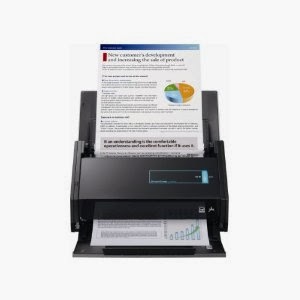
This is my latest toy - a Fujitsu ScanSnap iX500. It's an automatic document feeder scanner and what makes it special is these abilities:
- Can connect iX500 to computer via Wi-Fi
- Can forward scanned data to a mobile device via Wi-Fi
- Scans to Evernote, Google Docs and Dropbox
- Scans in duplex
It comes with some bundled software and works with both Mac and Windows computers. It will scan up to 600 dpi in colour or greyscale and 1200 dpi in black and white if you need the best quality resolution but at the lesser dpi it is crystal clear.
Most sizes are recognized and easily scanned - business cards, postcards, letters, legal size paper, letter size paper, receipts of all sizes, etc
If you use the included Carrier Sheet you can also scan fragile items such as photographs or oversize items. I haven't tried this yet but I plan to!
You can connect to your computer via WiFi or a USB port. When scanning you can insert 25 pages at one time into the feeder, press the scan button and in seconds the scans are on your computer. Then you choose where/how you want the file(s) to go - to a folder convert to a searchable PDF file, to email, to a mobile device, to
Evernote, to Google Docs or to
Dropbox. It is super easy and fast to set up and I am having a wonderful time scanning items and sending them to various locations.
So far I've scanned receipts and other personal papers. My next goal is to scan genealogy documents and other miscellaneous records. Going completely paperless will not be possible but I do plan on reducing our paper clutter as much as possible. The ScanSnap is going to aid me in that goal.
I am also going to scan the original ledger books that my husband and I have collected over the years. We had intended to transcribe the pages and put them on his website
Ancestors At Rest, but the task has proven too overwhelming.
.JPG) |
| 3rd basket of discarded papers in 2 days |
Rather than have the books sit in our basement gathering dust and probably be thrown out at some point, we are going to carefully cut the pages out and scan them as searchable PDF files, then upload those files to the website. That way other genealogists and descendants will be able to access these one-of-a-kind books.
We feel no need to preserve the actual physical integrity of these old ledger books as the important part is to make the contents accessible. And we do not have the physical space to continue storing the books, some of which are quite large (and heavy)
You can get
Fujitsu ScanSnap iX500 Scanner for PC and Mac (PA03656-B005)
at
Amazon.com or any of the big stores but Amazon seems to sell it cheaper than many others. In fact right now it is on sale for $409.99
This does not replace my flatbed scanner or my beloved
Flip-Pal Mobile Scanner
. They are different tools for different purposes.


 I just finished sorting & labelling hundreds of my family pics back to 1867 because I'm preparing for a huge scanning project.
  These are some of the early WW1 to 1960s era family photos I sorted and labelled yesterday.


.JPG)