Discover your inside story with AncestryDNA®
Showing posts with label Genealogy Organization. Show all posts

January 7, 2020

I Am My Own Worst Genealogy Enemy

Five (5) years ago, in October 2014, I messed up big time.

I'm only now discovering my error and realizing the mess it has created for me, genealogy-wise

In the image on the left you can see many jpg files with names starting with "GBPRS_CANT_" followed by a string of numbers. I discovered them as I was going through my hard drive organizing genealogy files.

Because they do not have identifying file names (surname, date, location at a minimum) I began opening them. They are a mix of baptisms, burials and marriages from somewhere in Kent England. The dates range from 1607 to 1832 so far but I have not checked them all.

One of 47 images that are not identified. Years are 1639 and 1640
Because the images are challenging to read and I don't have all my mother's Kent ancestors memorized, I looked in the meta data for each file for information. Nothing. Nada. It is blank for each one.

That means I was in such a frenzy of finding and gathering the images that I couldn't be bothered stopping for a minute to add the meta data OR at the very least, rename the files with the surname of the ancestor! Any of those would have helped me figure out who each record is for. I could even have simply annotated each one with an arrow pointing to the ancestor found on the page.

Baptism of NIcholas Widlbore in 1611. I have now added an arrow & labelled this one correctly.
Since I didn't do any of that, I am stuck going through each image, and trying to match names with my master list of surnames. I've been at it for hours now and have only managed to properly label 9 of 47 files.

I hope I have learned a lesson. I pray I never repeat this silly mistake in future! What ridiculous mistakes have you made as you've gone along in your genealogy research?

January 3, 2018

Organizing Your Genealogy Files

It's another year, another opportunity to create some kind of organization out of our genealogy files and notes. Yes, I said "our" because I'm pretty sure that most of you are in the same mess I'm in. I'm super organized in the kitchen. Spices are all in alphabetical order. Dishes and glassware are neatly placed by type and pattern. Cereal is in the cupboard in alphabetical order. You get the picture, right?

But my genealogy files? They're a mess, although I prefer to think of them as in a state of "organized chaos". I have had stacks of papers and documents so high they defied gravity. Oddly enough I'm very organized and methodical with the research I do on my New Netherland Settlers project and any genealogy that is not about my own ancestors!

One of the reasons I'm in a bit of a big mess with my personal genealogy is that every year I decide I don't like my current method of organizing my research and I start a new one. Since I've been researching my ancestors for over 30 years, obviously I run out of new methods and repeat former ones, with small modifications.

Over the years I've tried binders, filing cabinets, digital files instead of paper, storage tubs.... you name it, I've probably tried it. Of course within each method there is even more choice. For example when you use binders, you can file by surname, by family group, by location, by type of record, by individual.

I loved binders when I used them. I printed off family group sheets and filed all relevant documents and photos with the appropriate family. It was a great system for me until I had so many files filling dozens of binders and it became cumbersome. That's what happens the longer you look for, and find, ancestors.

Filing cabinets worked well for me until again, I found so many ancestors that my notes and documents filled so many cabinets they could not fit in my small office. Soon we had huge filing cabinets in my office, in the basement, and in our family room.


I'm even worse at organizing digital files. It's boring. It's tedious. I do use Evernote to help me with organizing those genealogy files but I still don't enjoy doing it.

I liked using storage tubs because I could just label each tub and toss the documents in without worrying about chronological order or sorting by location or whatever method might be best. Of course that didn't work well after awhile because I could never find what I wanted and I never got around to organizing the papers in each tub.


One of my family books
A few years ago I hit on the idea to publish books on my ancestors for my children. The books are between 20 and 30 pages and I carefully choose what documents and photos to use. I publish one book for each surname. I start with the furthest back ancestor I have with that surname and print his family group chart, then I include images of various documents of his life.

Each chapter contains documents (and a family group sheet) for the next generation down. I also add research I've done on siblings in each generation. The book ends wherever the surname daughters out for my direct line. This has been really fun and my children are enjoying them.

I'm ensuring that my research is not lost but the drawback is that I can't include every single fact and document. I didn't think it would solve my problem of organizing my papers but I was wrong! I've gone back to using filing cabinets for my research notes and papers, and when I create a book, I am forced to organize those documents before I begin writing.

My husband also came up with the idea of selling these family surname books. Much to my surprise other descendants have purchased them! So it's a win-win situation.  My genealogy gets organized, my children have individual books on our family surnames and ancestors, and other descendants can read about their ancestors.

How do you solve the problem of organizing your genealogy files? 

January 16, 2015

Organizational Project Part 2 - Family Diaries

A few days ago I began my plan to sort, organize and digitize my family photos.  I ended up ordering archival boxes and sleeves from a company called GetSmartProducts. A friend in Colorado used them and was satisified and since it is difficult to find an online company that will ship such items to Canada, I took the leap. 

Storage Boxes from pfile.com
Although the items will be some time reaching me, I was impressed when the company phoned me to say they were out of stock on some items. I had a choice - they would ship as the items were available, or hold until they could send as one shipment.

Since it looks like it will be 4 to 6 weeks before my items arrive, I went on to my next organizational project which was sorting my mother's trip diaries, scanning them and sharing them with other family members.

Let me explain first that my mother began going on small trips the year she retired at age 55. She always was an adventurer. At age 65 she took flying lessons, and built an ultra-light with her partner. Then just before her 80th birthday she decided she was going to embark on some adventures. Her first big trip was to Australia where she backpacked around with only a small Barbie Doll backpack she picked up at a local Wal-Mart store in Canada. 

I compiled, as best I could, a list of her various trips and the years she took them. She usually travelled alone as she preferred not having to consult with anyone else about what to see and do each day. In her years of travel (her last trip was in 2001 at the age of 85) she visited many countries. I would not be surprised if the list below has some trips missing. She often impulsively took what she called "little trips" without telling any of her children!


Mother in Australia, 2001
1971: Age 55. Her first trip was to Florida and California, making a side trip to Hawaii

1974: Arizona

1975: Maritime Provinces, Canada

1976: New Mexico, Europe (Holland, Germany, Switzerland, Italy)
1977: Texas

1978: Florida

1996: Australia & New Zealand (backpacking)

1997: Florida, Salt Lake City Utah, Ireland

1998: China

1998: New York

1999: Britain, Russia, Denmark, Sweden, Finland, Poland, Germany

2000: Australia (camping on safari in the Outback)

2001: Age 85. Alaska & British Columbia, South Africa, Australia

My first step was to go through her hand-written journals and photocopy the pages. Since she wrote in small day-planners I then had to cut and paste to put several days on to one page. Then I photocopied those cut and paste pages.

Next I created "cover" sheets which gave the date and the name of the trip. Mother had also typed up notes (not the same as her diary entries) and these were on her computer. I printed those off and figured out what went where, then sorted everything chronologically.
Mother on a bull, year unknown

This morning I used my document feed scanner, the Fujitsu ScanSnap S1500M Instant PDF Sheet-Fed Scanner , and created 6 pdf files of Mother's trips -  20 pages each. This scanner is awesome. I can't praise it enough. It's one of the best technical items I ever purchased.

Next I will send the pdf files to my family members who want copies. I am going to mail the printed copies (after I bind them as a book) to my mother's younger sister who is 92 years old. I know she'll enjoy reading them especially because she accompanied my mother on two of her many trips.

I plan on next copying mother's daily diaries that she kept when she was not on a trip. It feels good to finally bring some organization and preservation to these treasured family diaries.

January 12, 2015

Organizing Family Photos - Creating a Plan

Today I decided the time has come to sort, scan and organize my physical photographs. I have thousands. Some are older family photos going back to 1900 from my mother, her sister, my aunt and my mother's cousin. Some are my family photos from when I was a child, and others are from my life since 1970. 

I also have my personal collection of CDVs, Cabinet Cards, tintypes, ambrotypes and daguerreotypes. I  estimated I have over 3,000 of those. 

Organizing Family Photos - Creating a PlanTo start with I am concentrating on my family photos. You can see most of what I have in the photo on the left.  

As you can see currently they are tossed into plastic tubs but I want to store them in archival quality boxes.

The first thing I did this morning was take a look to see what sizes of photographs I need to store. That allows me to determine the size of boxes I need and make an estimate as to how many will be required.

Then I started making my plan. First - I decided what my goal was for these photos - what is the final outcome I want? I know I want to eventually scan them all so I need one box for unscanned photos. Some have been scanned already and those are already sorted into tubs so that will be fairly quick to get into archival boxes when they arrive.

Any plan for organizing photos will depend on how you want to store them - by family groups? By time periods? By names of the person you are going to give them to? The choice is personal. I want to give some of mine to my adult children as soon as possible, others I want to keep for my grandchildren when they are older and some I want to hang on to myself.

I decided I needed 8 boxes to hold 4x6 photos, 1 box for 8x10 and 1 box for 11x14. With the 4x6 boxes I will have one box for photographs for each of my grown children, one for recent photographs I don't want to part with yet, one box for my life as a child growing up with my parents, one box for my maternal grandmother's family and one for my maternal grandfather's family. 

When my boxes arrive I will sort the photos I have already scanned and get them put away. Scanning the photos not yet scanned will be something I do in bits and pieces over the coming months.

Next week I will create an organizational plan for my personal collection of mid 19th century photos and share that. I still have to create a plan for my digitized and scanned photos so I will work on that later this week and share it here on Olive Tree Genealogy blog.


August 20, 2014

New Ebook: Organize Your Genealogy in Evernote in 10 Easy Steps

New Ebook: Organize Your Genealogy in Evernote in 10 Easy Steps
Organize Your Genealogy in Evernote in 10 Easy Steps is now available on Amazon.com for only $1.25

This 22 page book  is a step by step guide to using Evernote to organize your genealogy files in 10 easy steps. 

You will learn how to create notes, how to set up notebooks, how to create stacks, the benefits of tags and how to set up a hierarchical structure for them, how to create virtual genealogy binders, how to merge Notes, easy ways to transfer your computer files into an Evernote Note, and more.

You will be able to follow each step to create your own Genealogy Notebooks full of your research (documents, photos, audio files, and more) on all your ancestors. 


Following these 10 steps your Genealogy files will be organized, easily accessible and readily available to share with others if desired. 

Please note that Kindle books can be read on any Kindle device, on iPhone, iPad, PC, Mac, Android device, BlackBerry, and Windows Phone 7, and through the Kindle Cloud Reader.

April 7, 2014

More Ways to Use Evernote to Create Virtual Genealogy Binders

Ready to send files from Frank Simpson folder on my computer
As a followup to my last post on using Evernote to create virtual Genealogy Binders I have continued playing with organizing my genealogy files using Evernote. There are a few more features I've discovered along the way which I want to share with my readers.

First, a caveat - be careful using the "Merge" feature! Once you merge notes, this action cannot be undone. Supposedly you can retrieve the original notes from your Trash and restore them to Evernote as individual notes but I am using a Mac and the notes I accidentally merged are not in my Trash.  

UPDATE! I found the trashed notes. They are not in the computer Trash bin but in the Evernote Trash. If you choose to view all notebooks, the Trash bin is displayed and opening it will show you the original notes. You can easily restore them to your binder or notebook so that you don't have to redo them.

Merging notes is something I do want to play with as I can choose PRINT in Evernote and then save the merged notes as a PDF file. That would allow me to more easily share or print the merged file for a hardcopy binder if I choose to do so.


Right click option to Send to Evernote
Next, a nice little feature I discovered this morning is a much easier way to insert notes into a binder (notebook). I have been creating a notebook (Frank Simpson) then within Evernote choosing the option "New Note in Frank Simpson". An empty note window opens and I then select "File>Attach Files" and search for whatever picture or document I wish to add. Then I give the new note a title and it's done.


The original notes restored and the merged notes still in the notebook/binder
This morning I found that I could do this in a different way. I open my Finder window (in a Windows computer that is the same as Explore) which shows all the folders and files on my computer. I go to where I know I have photos and docs for Frank Simpson. Yes I actually have some of my genealogy files organized so that I can choose a folder which contains all the documents and photos I have for an individual. 

Once I see the files for Frank I select the first one, right click and choose "Add to Evernote". The photo or document pops up in my default Evernote Notebook. It isn't in Frank's notebook but that's okay. I rename the note using the year as the first word in the title. I could also rename each note with surname then first name then description. Whatever I use as my renaming convention it needs to be consistent. 

I  continue sending all the photos and documents to Evernote. They are all in my default notebook. Now I make sure I am in that notebook and choose View>Expanded Card View. That pops up all the notes in that default notebook and because I have chosen alphabetical order for my notes, I can easily see all the notes I just added for Frank.

Next I highlight all the notes for Frank, right click and choose "Move to Notebook...." There is a small arrow which allows you to choose the notebook you want for those notes. I choose SIMPSON FRANK and bingo, all the notes I inserted from my hard drive are now in Frank's virtual binder. 

This method appeals to me as a more efficient way for me to put all my genealogy photos and documents into Evernote. Some of you might be asking "Who is this Frank Simpson?" Well he was my grandmother's younger brother. He came to Canada from England at the age of 15 to live with his older brother, but sadly died of appendicitis in Toronto in 1908 shortly before his 19th birthday. My grandmother often spoke of him and how much she missed him. I have the book he won at the age of 12 which is inscribed to him, and also the receipt for his funeral and burial plot so I feel very connected to him.


April 2, 2014

Using Evernote to Make Virtual Binders for Genealogy Organization

Using Evernote to Make Virtual Binders for Genealogy Organization
Last week Renee Zamora left a comment on my blog post Spring Is Supposedly Here and My Spring Organization Fever is High. 

Renee mentioned that she is using Evernote to create binders in order to digitize all her paper files. I'm not sure I want to go totally digital for my genealogy but the idea of organizing my computer files using Evernote appealed to me. I use Evernote daily for gathering and organizing recipes, for saving receipts for items I purchase online, etc. But I'd never thought of pulling in files from my hard drive and organizing them into Notebooks.

I should preface this by saying that my computer files are a mess. I'm terrible at organizing them! My thousands of family photos, scanned documents and saved images from genealogy documents found online are a hodge-podge. Some are in the Documents folder on my laptop. Some are in the Pictures folder on my laptop. Some are on my desktop computer, some are on my Western Digital MyBookLive, some are on one of 3 Western Digital Passports, and some are in the Cloud - and more than one cloud! I use Dropbox, Bitcasa and Google Drive so depending on my mood that day I might put the 1851 Census for Levi Peer in any one of those spots.

You can see the problem I have when trying to find something specific. I know it's in one of those spots and I know it will be in a sub-directory of my Genealogy directory, but where?? Sure I can search for  what I want but it's not always easy to find, and it's certainly time-consuming.

Using Evernote I'm able to pull each file in to a binder (Notebook) that I've created. I can see at a glance what I've got on each ancestor and even better, I can click on the item in Evernote, choose to view it in Picassa or Preview or whatever program I want, and then I can easily move or copy it to the proper directory on my hard drive. Killing two birds with one stone! I am making it easier to see my saved files and am able to organize my hard drive at the same time.

My Genealogy "Binders" on Evernote
The first thing I did was create a Notebook (I'm calling Notebooks "Binders" in this blog post) called "Genealogy Binders". Then I created separate Notebooks (Binders) under this main Binder. My individual Binders are set up to suit me, so I have one Binder for each direct ancestor. I am also making individual Binders for documents and photos I have for siblings of my direct ancestors. Each of these individual binders goes into what Evernote calls a "stack". Think of a stack like the folders and sub-folders on your hard drive. You can see my setup for this in the image on the right. By the way I'm nowhere near done with setting up my binders!

Then I opened a binder and began creating individual notes within that specific binder. For example, I opened Peer Gen 1 Stephen - Mary Elizabeth Vollick. I click on "New Note". Then I go to the drop down menu called FILE and choose ATTACH FILES. I am then able to search for and insert an image or document from my hard drive. You can see the marriage registration I put into a note inside the Stephen Peer & Mary Vollick binder. The other notes I've added are on the left sidebar. I can also view these notes in different ways if I don't like the sidebar view.

Creating a Table of Contents for one "Binder"
Once I have all the notes I want in a binder, I can do lots of different things. I haven't finish playing around with all the choices but one I really like is creating a Table of Contents for a binder.

All I have to do is select all the notes in a binder. Evernote lays them all out for me in a pile and then I choose Create a Table of Contents and it's done. The TOC displays as a new note in that binder.  Update: Apparently creating a TOC is only available for MAC users. Sorry to all you Windows users out there!

Table of Contents for One Binder
I like that the list of contents in the TOC are linked to the individual note so I can click on any one I want and immediately view it full-size. I also chose to give each of my notes a title that began with a year because then I was able to sort the notes in chronological order. This helps me see at a glance what I have as a timeline for each ancestor and what I'm missing.

This is as far as I've gone in discovering how to set up and organize my genealogy files as virtual binders in Evernote but I am loving it! Once I have everything organized as I want, I'll decide what my next step is. I already shared one binder with a family member (easy to do from the Evernote program) and I'm going to check out my other options at some point.

March 26, 2014

Spring Is Supposedly Here and My Spring Organization Fever is High

Spring Is Supposedly Here and My Spring Organization Fever is High
Supposedly Spring is here. I don't know about you but we have about 3 to 4 feet of snow still on the ground and yesterday we had a blizzard. Mother Nature's being very cruel this year. But the good thing about Spring is that suddenly I'm hit with a burst of energy and a strong desire to ORGANIZE!

Yep, every year I go through this. During the long winters I sit and think about the mess of my genealogy files. Every year I come up with a new way to organize them. Sometimes I go back to old ways, long discarded as not working. I've tried binders by surnames, binders by topics, pdf files on my computer, file folders by surname, file folders by topics... in short I believe I've tried every possible organizational method there is. In fact I've blogged about getting organized many times.

But I'm never happy. These past couple of years I've discovered quite a bit of detail (newspaper clippings, parish and church records, land petitions and so on) for several of my ancestors. I've also scanned many original documents in my possession. That's what made me realize my genealogy is getting out of hand. I'm overwhelmed by the sheer volume of my findings.

Hubs is in the same boat. He doesn't even remember who many of his further back ancestors are or what we know about them. So today we made a decision that starting this week we are going to set aside a minimum of one hour every day to sort, print and organize our genealogy files.

I'm going back to one of my very first methods that I used many years ago - binders. These binders will only be for my direct lines. However I'm not going to print genealogy reports or notes for my ancestors. Instead I plan to print a family group sheet for each of my direct ancestors. then print copies of all the documents I have for the parents on the family group sheet.

I suspect I will end up with many binders - each one holding ancestors sharing one surname for all generations. Ancestors whose data is skimpy will share a binder with other less detailed ancestors.  I'm not going to put all the siblings in these binders. I have them on my genealogy program and in my paper files and in my digital files so that will suffice for now.

For me it's about narrowing my focus, not expanding it! I tend to get carried away and research all siblings of every direct ancestor. Don't get me wrong, that is a very valuable research technique as it provides you with clues and information you may not find if you only research your direct. But I don't need to organize all those siblings into a binder.

So wish us luck! I have no idea how many weeks or months this will take but I'm excited about starting. 


September 11, 2012

Musings About Research Logs & Plans

Kim Cotton's article Research Logs on Walking Your Tree blog got me thinking about my own research habits.

Her  solution to keeping a standard research log is to create a spreadsheet of her research plans which she can access from any device once she is at a Library of Family History Centre.

Since she notates if her searches were successful or not, her spreadsheet becomes her research log

One of the areas I fail at is keeping a standard research log. I find it time-consuming, boring and so onerous a task that I simply can't bring myself to do it. But like Kim, I have over the years created an alternate solution similar to hers that works well for me. Without some kind of method of keeping track of my resources, I'd be checking the same sources more than once.

Inside page Research Log
My solution is to use school exercise books.  I have one for miscellaneous families and one each for my big research projects such as the Peer family, the McGinnis family and the Vollick family.  Those are huge undertakings as I am researching every child of the immigrant ancestor to the early 1900s. That's over 200 years of descendants.

In each book I record what I want to check next. So if I have found a record for an individual and that record indicates he (or she) was a naturalized citizen, I will immediately make a note in my book that I want to find the naturalization record of this individual. I add a note as to the years of interest and what county or state or province I need to focus on.

At some point I check various catalogues to find out if there are microfilms I can use to hunt for the naturalization record, or can I search online. I add this information to my research note. Basically I jot down everything I am going to need to know to hunt for the record I want. This becomes my research plan.

I keep adding notes as I find items that provide clues to further research. My exercise book soon fills with my research plans. The notes don't need to be in any particular order because when I am at a library or archive where I can conduct offline research I simply go through the notes one by one.

If I find something, I notate that the search was successful and put a line through my entry.  That simple line allows me to still read the entry and use it as my source citation if the search was successful (because I've already noted the exact microfilm number and repository or website or book information).

If I don't find anything I still put a line through the entry. The crossed out entries become my research log. I can easily see that I've already searched resource X for a record and was successful or did not find it.

I  try to group my "to-do" lists by family groups.  For example if a man states he naturalized in Michigan in the 1870s I will add his brother's names to his note. That way when I hunt in Michigan naturalization records I have all the names handy to check for everyone and I don't have to bring up my Family Tree.

Kim's blog post made me start thinking about the added benefit if I convert my exercise books to a spreadsheet. Why did I use exercise books in the first place? I started keeping them in the days before cloud storage and before smart phones or iPads. But maybe it's time to update my organizational method!

Using a spreadsheet would mean I can easily reorganize my notes. I could, for example, arrange the notes by specific ancestor or by microfilm or book title. That would allow me to be sure I search one resource for all individuals, or to search all my listed resources for one individual.

A spreadsheet would also allow me to sync it to any device so that I could bring it up on my iPhone or my iPad if I were travelling and wanted to limit what I have to carry with me. It also allows for more impulsive researching if I happen to stumble on a local museum or archive and only have my iPhone with me. I'd probably keep my spreadsheet on Google Drive as I prefer it for cloud storage of documents.

July 12, 2012

Passing on Your Family Genealogy Treasures to a Descendant

Readers might recall that in 2009 I wrote several bog posts about Starting a Genealogy and Family Hope Chest

Since starting an antique box with my family odds 'n ends of genealogy treasures, I've run out of room.  In fact I've filled three similar size boxes with my treasures.

What do I keep in my treasure box? Original family documents (land records, deeds, marriage certificates, birth and baptismal records, death certificates etc), family bibles and journals, WW1 paybook and records for my grandmother's brother,  school report cards, wedding invitations, letters, postcards and more. I only keep original items that belonged to someone in my family, not photocopies of records I've found while researching.

But because I was filling boxes so rapidly, I decided to transfer all my documents and records, family treasures and journals (my own plus my mother's) to one large antique blanket box.

You can see the blanket box I'm going to use on the left in this photo. It already had a few items in it so I'm going to have some fun going through my smaller boxes and re-organizing the items to go in the blanket box.

It's always fun to take that trip down memory lane each time I reorganize the treasures. I spent a few hours last time reading through my grandmother's handwritten recipes which I've kept. Hopefully you are keeping your own genealogy treasure box to be passed on to a descendant.


April 25, 2012

Update on Genealogy Re-organization

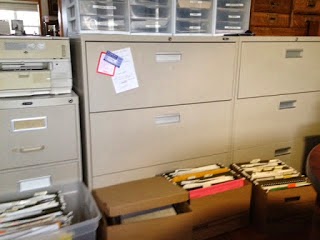
Well, these 8 filing cabinet drawers in my current office are empty. And the files they contained have been sorted and purged.

You can see a few of the boxes of files ready to be moved to their new home. Those that I need on a daily or weekly basis are going to my new office in the loft.

Those that I use a few times a year will go to our basement family room and the ones that I need to keep but probably never look at again are going to our basement storage room.

I still have to empty 2 more lateral filing cabinet drawers (6 linear feet) and 2 letter size filing cabinets.

Then I'm ready to tackle the bookcases!

Phew. My son will be here on Friday to help move the furniture so I have to have everything ready by then.

Hubs moved some of the packed file boxes to the basement for storage and he's going to move the rest into our dining room temporarily. I can hardly move in my office at this point!

On the right you can see the huge box of papers I'm burning. Hubs already burned one box this size. The box is as tall as my desk.

It's been exhausting and tedious but what a great feeling to purge! I had no idea I'd enjoy it so much.

There's much more to do but we've passed the half-way point now!

April 18, 2012

Update on Major Genealogy Re-Organization

 Stage 1 of the genealogy re-organization in preparation for the move shows some of the tubs and boxes I'm using for the sorted files.

These are some of the files that are going up to the loft once the filing cabinets are moved.

My method is to go through every filing cabinet drawer in my current office space. I'm sorting and tossing - a huge purge of papers!

Once I've sorted a file folder I decide if it's going to the loft (where my new office space will be) or to the basement filing cabinets (so I can still access it if needed) or to basement storage

Basement storage is where I put items that I don't need to access in the foreseeable future but don't want to throw out. It also includes paperwork relating to my business which I must keep for 7 years.

The image on the right are cardboard file boxes that I had to purchase in order to pack up some items. The bottom two are going to the basement for storage even though one is research for a book I hope to write one day. The key words are "one day".

I will store the research material out of my main office until I am ready to start compiling it. The box labelled PEER BOOK is going to the loft but once there it will be sorted.

The first volume of my planned series on the Peer family of N. America has been published so I'll remove the research material I used for that book. Volume 1 research materials will be given room in the basement storage area but the rest will stay in my new office so I can access it.

So my basic simple plan is to sort into 3 types of files:

One is current and important papers and documents (genealogy, business, personal) that stay in my new office and I can access easily. These are things such as research for a current book I am working on, client work, and so on. These will go in my new office space.

Two is papers and records I might need in the next few months or year. These will include research on books I have planned to write but are in the queue waiting their turn. These will go in the basement filing cabinets.

Three is papers and documents that I may never need again but I can't bear to throw them out! This also includes the 7 years worth of business receipts and records that I'm required to keep by law.  These will be boxed, labelled and put into the basement storage room.

I'm almost finished all the filing cabinet drawers. I just have 1 1/2 lateral filing drawers to sort and 2 smaller legal size drawers in another cabinet.

Once I'm finished those drawers I'm moving on the piles and piles of loose papers on my desk, on my credenza, on the floor and stacked in tubs. Oh boy. I've got a plan in mind as to how I'm going to sort and re-organize those loose papers and will talk about that in my next blog post.

Above you can see the huge box I'm filling with papers for hubs to burn. This is my second - he already burned one full box!

April 14, 2012

A Good Start to Genealogy Re-Organization

One empty drawer...
Yesterday I wrote about starting a big genealogy re-organization. Well I'm happy to report some progress was made! After four hours I got one drawer in one lateral filing cabinet sorted, reorganized and emptied for the move.

The filing cabinet drawer you see on the left was full. The filing folders you see in the tub are what I pared it down to. The binder is just to hold the files upright. 

I have 5 more of those drawers to go plus two more the same size in my credenza. That's not counting my other filing cabinet in the room.

I don't want to do the math to get a total number of hours needed just for the filing cabinets.

Of course I need to figure out where the files being moved are going until the loft is cleared out. Oh boy that's another little problem of logistics!


The start of a pile of books going to new office
I also managed to clear part of one bookcase and sort the books into three categories.

1. going to my new office in the loft
2. going to Kak's pine bookcase in the sunroom
3. going to the basement

I might take this opportunity to inventory the books too.

I have a pretty big stack of papers for burning and some have been shredded.

It's fun to find things that have been mis-filed or that I forgot I had! I found a short story I wrote about 12 years ago and had no idea where it had gone.

I want to create some simple drawings to go with the short story and turn it into a 15 - 20 page children's book. Then I'll publish it through Shutterfly and give a copy to each of my grandchildren. 

Do you think I have time? Hubs has already cautioned me not to get side-tracked.

April 13, 2012

A Big Genealogy Re-Organization Starts Today!

Today's the start of an exciting project. Because my husband received so much antique furniture, china and collectibles from his grandmother Kak's home, we need more room. We already have a house full of furniture and our own antique collections. An addition is out of the question so I'm giving up my 16x20 office.

I'm downsizing from that big room that I've used for the past 15 years to our much smaller 12x15 loft room. That's not a sad decision, it's an opportunity to make big changes and purge and organize my paper files! That's always been a hard thing for me to do. I'm a paper saver. Yes. I love paper files. I've digitized about 50%, but I always want my paper backups.

Downsizing is Tricky

Some of my current filing cabinets
But not only is the loft smaller, it has slanted ceilings and only 3 walls. Because one wall is railing where the loft overlooks our cathedral living room. So I don't have room for the tall credenza and two tall bookcases that I currently use.

Because the loft is chopped up with a dormer at one end and a small powder room at the other, I don't have a lot of wall space. And there is only one full height wall. So no room for my two lateral 3' long filing cabinets, and my rolling antique dentist unit that I use for office materials, or my pine harvest table that currently holds my hanging files or.... well you get the picture!

I am going to have to weed down to 3/4 of my current desk (hubs has to figure out how to make an l-shaped desk out of a u-shaped one), my credenza and one lateral filing cabinet. Oh yeah and one bookcase.

So all my files have to fit into the credenza or one filing cabinet. A challenge to be sure! I am going to have to purge like crazy. The one bonus is that I can put my second lateral filing cabinet in the basement for overflow. Phew. 

Hanging File folders on harvest table and one bookcase
Today's the day I begin sorting and organizing and purging. I'm anxious about it but a big part of me is looking forward to it. It's spring. It's a new beginning. And the pot of gold at the end is an entertainment/family room full of Kak's bequests mixed in with our own furniture that we've been cramming into whatever space we could find elsewhere in the house.

Figuring Out a Working System

I've got a bit of an idea for a working system to start the process. I figure I'll sort first into business vs genealogy vs personal. Three basic "piles". Business vs personal is easy - anything older than 7 years gets shredded. The rest gets organized into categories, labelled if needed and only the current year stays in my files. Older years go into a large envelope, labelled by year and taken to basement storage.

This will be a flexible system, and I'll change it as needed. 

Sorting Genealogy Papers

Genealogy is the hard one for me!  I'll start by sorting papers by the following criteria and then decide what goes to the loft and what has to go to the basement:

1. my personal genealogy
2. client work
3. research for family history books I'm writing or planning/hoping to write

That means I finally have to steel myself to toss the photocopies of French documents I used to write my first Van Slyke history book. That's a pile of papers at least 3 feet high. Maybe higher.

That means I have to throw out the copies I've keep of documents about various family lines that aren't mine. You know, the ones you keep "in case". In case some other genealogist ever asks you about that family. In case you one day find out you are related. I'm taking the plunge, after 25 years with me I don't think I need them taking up space in my home anymore. That's going to be tough to do.

But perhaps I'll finally be able to proudly proclaim that I have indeed organized my genealogy!


December 30, 2011

I'm a Genealogical Hunter and Gatherer Not a Data Enterer


Continuing on from my New Year's Genealogy Resolution for 2012... I've been doing a great deal of thinking about my genealogy organization and record keeping.  Basically it's about using my strengths and ignoring or working around my weaknesses!

Strengths vs Weaknesses

What are my strengths? I'm a very thorough and focused researcher. I'm good at finding information then taking taking that newly-found fact, analyzing it and figuring out what it means in the overall picture, and where to look for the next clue or fact. 

What are my weaknesses? I'm not good at data entry. I get bored and distracted easily.

The Laws of Genealogy?

Okay is that the worst sin for a genealogist? Who says I have to enter my data into a genealogy program? Or, if I choose to enter it to keep relationships straight, where is it written that I have to enter it immediately or in excruciating detail?

It has finally occurred to me that it's okay to record my genealogy research in whatever method best suits me. It's important to me that I cite my sources precisely and accurately and that I know where every single piece of information came from. But there's no genealogy law stating I have to type out every word from every birth registration or census record or death certificate.

And so it's okay to print off or photocopy all the records I find, note the source (in detail!) neatly on the paper, then file it using whatever filing system best suits me.

Using Pointers in Genealogy Program Notes Section

I like to record the names of individuals in my genealogy program so in the Notes section for that person, all I need do is type a notation such as "Birth Registration copy in File Folder A" where "A" is the name I've given that file folder (or binder)  I can also point to digital copies of the noted record.

What a liberating moment!  I've  given myself permission to enter details as and if I wish. Yes I will continue to carefully note sources but I no longer feel compelled to record every word in each record twice - once on paper and once in my genealogy program.

I've made my decision. I'll use my genealogy program to give a one line summary of the record I found, and a pointer to where the copy of that record is in my digital or paper filing system. I may give a brief synopsis of the new fact but if I don't think it's necessary, I won't bother as the paper record is there at my fingertips for reference.

Establishing Daily or Weekly Time Periods

I'm also going to start setting certain days or half-days each week for specific projects.  This will work within my habit of jumping from Project to Project. But with the added structure of an established weekly time period I am much more apt to complete each project in turn.

For example I'm working on a book on involving children in genealogy so I'm going to structure one day a week for that.

For my project to create video tutorials on dating old photographs which I'm creating for the Olive Tree Genealogy channel on YouTube I'm setting aside one day a week until the set of videos is completed.

A half-day per week will be allotted for organizing my digital files. That's a job that badly needs doing but I keep putting it off, or I make a half-hearted stab at it but never really stick to it. But I know myself well enough to know that if I make it a bit easier on myself, I can do it.

It's much easier to stick with a task if I say "I am going to spend one hour cleaning the bathrooms today" then if I look at the bathrooms and think "Wow these need cleaning but it's going to take me several hours to do a good job" By the way we have four bathrooms in our house so it can be a pretty big job.

I find that if I tell myself I only need to spend ONE hour at a task, I often go beyond that time once I get into it. This also works great for non-genealogical and boring tasks such as exercising.

2012 - bring it! I'm ready for you. 


December 29, 2011

2012 New Year's Genealogy Resolutions

Every year I set my genealogy resolutions. Jan. 2011 Resolutions consisted of one goal - seemingly a simple goal. That goal was to stay focused on one genealogy project at a time.

I didn't meet it. In fact I didn't even come close. I tried. Believe me I tried. But if there's one thing  I learned from this "failure" it's that I am an impulsive genealogist.

Getting Side-Tracked 

I get side-tracked easily. Repetition bores me, so a project that begins as a fun genealogy project quickly becomes a tedious task for me.  I love the challenge of the hunt! I grit my teeth when I reach hour 3 or 4 of entering the information that I found in my research.

I can happily spend 10 hours researching and not notice the passage of time. But show me the results of my 10 hours of research and tell me it's time to enter all that data, and the moaning and groaning and whining begins.

So much tedious time-consuming W O R K when I  could be having F U N doing more research, finding out more about these new ancestors!

A Typical Example

Let's look at a few examples - I started a project to look through Poor Law Union correspondence and extract the names of poor people being sent from England to Canada in the mid 1800s. Then I did some research in census records to find more information on these individuals. It was so much fun. What wasn't fun was organizing it and creating the webpages to put it all online! I did finally finish it but only through sheer will power and a lot of stern scolding from myself to myself.

While working on the Poor Law Union records, I began concentrating on putting all my old cemetery photos into videos for Olive Tree Genealogy YouTube Channel. I love doing that. But that's my problem - creating Cemetery Walks became my "break" from the Poor Law Union records.

Poor Law Union boring me today?  - no problem, set it aside and work on the Cemetery Walk videos. Oh, that's boring me now because I am trying to find all the photos from 3 years ago? Okay take a break from that boredom and scan my family photos. Oops, two months has gone by and I haven't gotten back to the Poor Law Union records - ack!

You see my conundrum.  I jump from task to task. When task A becomes boring to me I'm off to Task B. Then C and D and....  on and on it goes! And so I end up with anywhere from 10 to a dozen genealogy projects on the go all at the same time.

Genealogy Strengths vs  Weaknesses

I've fought this all my life.  But I've finally learned something very important! I need to work WITH my strengths, not against them!  Instead of trying to become what I'm not, I need to focus on what I am.  That way I can improve in my strength areas instead of fighting my own nature all the time.

What are my strengths? I'm a very thorough and focused researcher. I'm good at finding information then taking taking that newly-found fact, analyzing it and figuring out what it means in the overall picture, and where to look for the next clue or fact. I also work well with a deadline.

What are my weaknesses? I'm not good at data entry. Repititous tasks bore me. I skip over tasks I find boring, setting them aside for "later". But "later" doesn't always come!

2012 Genealogy Resolutions

My 2012 New Year's Resolutions are:

1. Focus on my genealogical strengths (researching and fact-finding) and continue to build and improve on those

2. Improve on my organization of genealogical records, but not worry or stress over not entering it all in minute detail in my genealogy program

3. Set deadlines. Make one day per week the day I work on Project A and a second day of the week the day to work on Project B. No more worrying if I jump from project to project! Allow myself to jump around as much as I want but work towards deadlines for completion of Projects A, B, C etc.  I need variety but I also need the deadline to provide structure and a timeline for completion of my multitude of genealogy projects

And so I've not only come up with what I believe are more realistic 2012 Genealogy Resolutions, I've also come up with a new method of organization of my genealogy. I'll write about that next week so please do come back, read my idea and jump in with your own ideas, suggestions and thoughts!

November 18, 2011

What Will You Do With Your Genealogy Research?

Randy Seaver wrote an interesting blog post about his hopes and his plans for his genealogy research after his demise. For an avid genealogist of a certain age, this is a question of huge importance.

I am a firm  believer that no one,  no matter how interested, will want my 6 filing cabinet drawers of loose papers. No one will want dozens of family surname binders. 

This extends to all of us. Who would want drawers and drawers of loose papers, no matter how well organized? Who has the time to read it all or the space required to store it?

Digital copies on DVDs? Maybe.. but will they survive technological changes? Will they be readable 50 years from now?

It is unlikely that any museum or library will want your work in loose form.

For me, the solution has always been clear in my mind. The only way I can come close to guaranteeing that my years of hard work will not be lost is to write and publish family books. I can self-publish using any number of websites such as Lulu.com, Shutterfly.com, Blurb.com and soon.

I can print books myself, create laminated covers and bind them using coils. I could print copies of all documents, run off a family pedigree chart and place everything about a specific person or surname in a binder.
 
That doesn't work well for me as I would end up with 50 or more binders. I don't think anyone would want to give them house room! But it is an option.

That takes care of the documents and research I've done. But what about treasured photographs?

Some of the Family Books I've self-published
Again, in my mind it's a clear choice. I use Shutterfly to create family photo albums. I label each photograph and sometimes I put in a brief sentence or two about that specific photo. Then I have them printed and I distribute them NOW to family members.

I'm not going to risk keeping them in my house and hoping that when I'm gone my executor will take the time to distribute them. By giving them out now, I've also got insurance against a fire or other calamity destroying all the copies in my possession.

Another thing I do  is  create photo books on Shutterfly and order 4 in hard cover - one for each of my children and one for me. Then I inform other family members (siblings, cousins, niece and nephews) that copies in soft cover are available. (Soft cover is cheaper than hard cover. ) If they wish to have their own copy, I simply charge them exactly what Shutterfly charges me, then I have the copy shipped directly to the family member who asked for it.

Not wanting to leave anything to chance, I've also worked very hard and consistently over the years to encourage my grandchildren in the love of family history and genealogy. I've played games with them, talked to them, shared stories, showed photographs and family treasures (talking about the ancestor whose photo or treasure it was).

My theory is that since I have 13 and soon to be 14 grandchildren, at least one of them might take up the torch for me! And if no one does, that's okay too because I know that some of them will remember bits and pieces of the stories and be able to pass those memories on to their children.

The last thing I've done is to tell my husband and also leave written instructions for my executors as to what I would like done with my collection of genealogy resource books and my collection of Civil War Era Photo Albums that are not of our family.  My wishes may or may not be carried out but I've done what I can to ensure that they are.

Have you thought about what will happen to your years of research? Have you developed a plan or set one in motion? I'm curious to learn what others are planning.

August 9, 2011

Confessions of a Genealogy Hoarder

I've always been keenly interested in New Netherland (present day New York) - its history and settlement and most of all, its 17th century settlers. My interest began when I discovered I was descended from several of those early Dutch and Walloon immigrants - Van Slyke, Vrooman, Bradt, Ryckman, Damen, Van Valkenburg.... to name only a few.

As I began researching my own New Netherland family lines in depth I also became interested in others. Because it was so difficult accessing the early records I needed for my research I began to build my own personal research library. I bought out-of-print books and reprints of previously published books. I sought out (and found) all the original court record books for New Amsterdam (now New York City), Beverwyck and Fort Orange (now Albany).

Crumbling NYGBR
Eventually after acquiring dozens of books of 17th century church records, court records and orphanmasters records, I realized there were no more to be had. But the New York Genealogical and Biographical Record (NYGBR) had published many church records and other primary source records that were not found in other formats. I'd been working on an article (The European Origins of the Boelen Family: Boele Roeloffson and His Wife Bayken Arents in Amsterdam ) for the NYGBR which was later published in that journal in April 2000 so I was familiar with the types of articles they  published and those also held appeal for me.

And so I contacted the NYGBR and explained what I wanted - every single issue of the journal since its first publication.  I think they were shocked. They explained they were missing some of the earlier issues but they would ship what they had. I don't want to tell you what this cost (the journals + shipping + border crossing fees + Ontario taxes = gulp) because I'm afraid putting it in print means I've slipped into the realm of those who spend more than they can afford on something they don't really truly need. Or being a hoarder.

When my boxes of journals arrived months later, whoever packed them had done an inventory by hand of every volume and every number and every year. I was the proud, and I admit overwhelmed, owner of 374 yellow journals dating from January 1870 to January 1999.

374 NYGBR journals spanning 129 years. Some of the earlier ones were crumbling. The covers were crumbling with pieces falling off every time they were handled. I made room on all my bookcases in my office. They filled every space and that meant all my carefully sought out-of-print or reprinted books on New Netherland had to go. But where? I wanted everything at my fingertips not in different rooms.

One of my tubs of NYGBR
I struggled with this for several months. My husband complained about the bits and pieces of crumbling covers. It was difficult to do the research I needed to do for my planned series of books on New Netherland Settlers. I started photocopying the sets of primary records I wanted, and put them in binders so I could use them easily. But that was a horrendous job and it never was completed.

And then the NYGBR came out with the entire set on CD ROM a few years later. So I ordered it too. And I packed up my 374 journals, put them in waterproof tubs and had my husband store them in one of our barns.

And there they lie. It bothers me. I don't like using the CD-ROM versions. I know they will not always be accessible as books/journals are.  I want to be able to access every single set of church or miscellaneous records in those journals. But the photocopying project that entails overwhelms me.

Tubs of NYGBR Journals
So I have a dilemma which I've been mulling over for 11 years - what to do with my 374 NYGBR journals?

* Should I find room for them somewhere in my house? That's not physically possible

* Should I destroy the journals by cutting out the pages I want and putting those pages in binders? That idea makes me shudder, there seems something so inherently wrong about that!

* Should I suck it up and start the photocopying project? That seems the best solution of the three I have thought of but then what do I do with the journals? Donate them? Where? No library near me would want them (I live in Ontario Canada, not much call for 17th century New York records) To ship them somewhere would cost a fortune.

And can I give them up? Maybe that's the true test of whether or not I'm a genealogy hoarder. I don't think I can part with them!

I could really use some input and suggestions!