Discover your inside story with AncestryDNA®
Showing posts with label Shutterfly. Show all posts

July 4, 2020

The Problem of Family Not Wanting Your Genealogy Research

Several years ago I came to the realization that no one in my immediate family wants my 40 plus years of research on our genealogy. A few are mildly interested in hearing the more exciting stories of blacksheep ancestors or famous relatives or an intriguing mystery. No one but me does actual research into our ancestors.

That means that my binders and file folders full of documents and charts are not something anyone is going to take and preserve when I'm gone. I'm sure many of you are facing the same problem. So...what to do?

My solution has been to create family books for each surname. I keep them short, no more than 30 pages for each book. Some surnames have multiple volumes and each volume is for one generation including children. These books are what I call "Coffee Table" books, meant to be picked up and thumbed through casually. Not all documents are included because that would turn into a book consisting of hundreds of pages! 


After publishing them on Shutterfly I give them as gifts at Christmas. That is one way the family stories and research might be preserved for future generations. If you are unfamiliar with Shutterfly I have a tutorial on using it on my Olive Tree Genealogy YouTube Channel.

Creating a Memory Book in Shutterfly (Tutorial 1)


Creating a Memory Book in Shutterfly (Tutorial 2)


Creating a Memory Book in Shutterfly (Tutorial 3)

From Van Valkenburg to Vollick
V.1 The Loyalist Isaac Van Valkenburg aka Vollick
and his Vollick & Follick Children
Another solution I use is to create books for sale to other descendants. Since I tend to research all siblings in a family I can often provide details, facts and documents on a large number of family members for each generation. I use Amazon KDP for those books which then are made available on Amazon. 

See my list of books I have published here.  Money I make from these sales helps offset my expenses in subscribing to online companies for their databases.

I also donate a copy of any books I create to local archives or libraries where the family settled.  This helps ensure that even more descendants will have access to my research in the future.

How have you overcome the problem of your family not wanting your genealogy records?

March 23, 2016

Creating a Family Story and Memory Book

Olive Tree Genealogy Blog: Creating a Family History Story Book
Recently Volume 2 of my McGinnis Family Story Books arrived from Shutterfly. I'm really pleased with how it turned out!

First I scanned the family photos I wanted to use in my book. After transferring the scanned photos to my computer I organized them into a directory on my laptop 

Then I uploaded them to Shutterfly. I created a different size book this time.  Usually I go with the 8x8 books because they are small, easy to pick up and glance through and I just like the look of them. But this time I went with the 8 1/2 x 11 and I'm really glad I chose that size.


Olive Tree Genealogy Blog: Creating a Family History Story Book
The 8 1/2 x 11 allowed me to insert a census image that was legible but had room around the edges for the page background. I could have added a border around those images or embellished the page with a "sticker" but I like the larger images to be simple and plain.
 

You can read how I organized my book at Creating Memory Books on Shutterfly  It's important to plan the layout of your book before starting. 

 Decide on how you want to organize the pages and photos - by person? Chronologically? You can always switch pages around once you've created pages in Shutterfly but you need a plan to begin.


Think about how many pages you want. I create mine to be between 20 and 25 pages. If it is going to be bigger, I break the book into separate volumes. As an example, my Story Books on my McGinnis family are in 5 volumes, one for each generation starting with my father. The smaller the book, the more manageable to create and the more likely your recipients will be to pick it up and skim through it. Anything larger than 25 pages is, for me, overwhelming to create and I believe would be too much for most people to want to glance through.


Olive Tree Genealogy Blog: Creating a Family History Story Book
Shutterfly allows me to create photo pages, or text pages or a combination of both. It's easy to quickly pick a layout for each page using their layout options. So if you want to place two photos and one text box on a page, for example, you choose from their options for 2 photos plus text.

Then by using the "customize" feature found on each page you can resize and rearrange the photo and text boxes. You can add more text boxes if you want. Then you can change the background by choosing from their options for whatever theme you are using.


Olive Tree Genealogy Blog: Creating a Family History Story Book
In this volume of the McGinnis family story, I added scans of newspaper clippings from a family double wedding. I am lucky enough to have the actual wedding invitation so I added that to the page along with photos of the church and of the happy couples.

In the end the book is a lovely coffee table book resembling a scrapbook. But it has enough genealogical information and documents to give family members a taste of what I have found on the family. It also allows me to share the wonderful family photos, documents and newspaper clippings in my possession.


You can also refer to my video tutorials on creating books in Shutterfly. 

Creating a Memory Book in Shutterfly (Tutorial 1)

Creating a Memory Book in Shutterfly (Tutorial 2)

Creating a Memory Book in Shutterfly (Tutorial 3)

Creating a Memory Book in Shutterfly (Tutorial 4)


I have now created 5 volumes of my McGinnis family, one volume per generation, starting with me, then my parents with all their children, then my grandparents and their children, back to my great-grandparents who came from Ireland to Ontario Canada in 1846 during the Famine Years.

September 3, 2015

Video: Showing a Finished Family Tree Book Created on Shutterfly

2:12 p.m. Eastern Time
LIVE on #Periscope: Showing a finished family tree book using Shutterfly

This video is now on Periscope TV for the next 24 hours. You can also find it on my Olive Tree Genealogy YouTube Channel as  Creating a Memory Book in Shutterfly (Tutorial 4)

September 1, 2015

The Problem of Family Not Wanting Your Genealogy Research

The Problem of Family Not Wanting Your Genealogy Research
Several years ago I came to the realization that no one in my immediate family wants my 40 plus years of research on our genealogy. A few are mildly interested in hearing the more exciting stories of blacksheep ancestors or famous relatives or an intriguing mystery. No one but me does actual research into our ancestors. 

That means that my binders and file folders full of documents and charts are not something anyone is going to take and preserve when I'm gone. I'm sure many of you are facing the same problem. So...what to do?

My solution has been to create family books for each surname. I keep them short, no more than 30 pages for each book. Some surnames have multiple volumes and each volume is for one generation including children. These books are what I call "Coffee Table" books, meant to be picked up and thumbed through casually. Not all documents are included because that would turn into a book consisting of hundreds of pages! 

After publishing them on Shutterfly I give them as gifts at Christmas. That is one way the family stories and research might be preserved for future generations. If you are unfamiliar with Shutterfly I have a tutorial on using it on my Olive Tree Genealogy YouTube Channel.


Creating a Memory Book in Shutterfly (Tutorial 1)

Creating a Memory Book in Shutterfly (Tutorial 2)

Creating a Memory Book in Shutterfly (Tutorial 3)

Another solution I use is to create books for sale to other descendants. Since I tend to research all siblings in a family I can often provide details, facts and documents on a large number of family members for each generation. I use Createspace for those books which then are made available on Amazon. See my list of books I have published here.  Money I make from these sales helps offset my expenses in subscribing to online companies for their databases. 

I also donate a copy of any books I create to local archives or libraries where the family settled.  This helps ensure that even more descendants will have access to my research in the future.

How have you overcome the problem of your family not wanting your genealogy records?

August 5, 2015

Easy Steps to Creating a Family Tree Book

Are you eager to create a beautiful book of your family tree to share with relatives? 

There are several online self-publishing websites where you can create such a book. The one I use most is Shutterfly so I've put together a series of step-by-step videos to walk you through the process.

The videos are freely available on my Olive Tree Genealogy Youtube Channel


Enjoy and have fun!

Creating a Family Tree Book in Shutterfly (Tutorial 1)

Creating a Family Tree Book in Shutterfly (Tutorial 2)

Creating a Family Tree Book in Shutterfly (Tutorial 3)

July 17, 2014

Family Fun Days - Have You Had Yours?

Family Fun Days - Have You Had Yours?
Some of my blog readers might recall that every year I host a Family Fun Day (aka Family Reunion). Hubs and I create different games each year - some have a genealogy twist, some are Scavenger Hunts, others are races. If you're looking for game ideas and f you want to read about some of my former Family Fun Day ideas and activities, just click on Family Fun Day and Family Reunion

This year I decided to keep it simple. We built an in-ground pool last year for my physiotherapy water sessions, and it seemed obvious that most of our family and friends would enjoy just relaxing by the poolside. But just in case I set up 4 fun events, all based on old-fashioned games.

We had an Egg on a Spoon Race, Corn in Your Shoe Race, Froggy Hula Hoop Event and a good old-fashioned sack race. Of course there were prizes for the winning team.

I always draw quick sketches of each event showing the rules and how to play. 


I like folks to mix it up and get to know other family members (each year I invite someone new that other family don't know) That means husbands and wives can't be partners during the games.

So this year I gave out Leis to everyone and the idea was that each person was to find whoever was wearing the matching lei and that would be their partner for the events.

The photos you see here were taken after the posters for each event sat out in the rain so forgive the worn appearance!

The key to a successful Family Fun Day is organization. So if you have not held one yet, be sure you plan it carefully. If you're like me you will need to make notes on what needs to be done. I covered my White Board in my kitchen with daily "to-do" lists starting on the Thursday before the big day.


Of course I also put out the Shutterfly books I created for our McGinnis family for everyone to look through.

I also have a plan for the day itself. Flexibility is built into it but it's important to think about timings - when will you eat, how far ahead will you set up buffet tables, when will you hold the games, when to serve coffee or tea, and so on.

Because I put family members to work I also create a timeline which I post on my white board or the fridge. It lists what needs doing throughout the day. That way if it gets hectic (as it always does!) I can simply ask people to help with a specific task and point them to the white board where they find details on what needs doing.

A quick diagram of where I want the events set up in our yards helps with organization when I ask my husband or son to get that set up with flags, ropes, traffic cones and whatever equipment is needed for each event. I just hand them my sketch, point to the tubs of equipment and they manage the rest without any input from me. You can see from my sketch that it isn't elaborate - it takes about 5 minutes or less to create.

So remember - organization and flexibility are the keys to a fun and successful Family Fun Day. Have you had yours this year?

December 5, 2013

A Genealogy Baker's Dozen Gift Ideas

A Genealogy Baker's Dozen Gift Ideas
Every year I publish a Christmas Wish List for Genealogists. Here are a few of my items from last year plus a few more. Start your Genealogy Christmas shopping now and surprise your loved ones (or yourself!) with a creative Genealogy gift.

1. Ancestry.com World Subscription (or any other genealogy subscription-based site you like)

2. Flip-Pal Mobile Scanner to take to Archives, Libraries and on field trips. Read my first review from November 2010 at Flip-Pal Mobile Scanner, Best Thing Since Sliced Bread

3. RootsTech Registration. Ask your loved one to register you for RootsTech 2014 coming up February 6 - 8, 2014

4. Fujitsu ScanSnap iX500 Scanner for PC and Mac (PA03656-B005)  I recently bought one of these and I am loving it! It's a wireless document feeder scanner. I can scan up to 25 items at once and they appear automatically on my computer in one file (or in Evernote or Dropbox or many other choices!)

5. Evernote Moleskine notebook. I don't have one and am pretty anxious to try it out! Apparently you write in the notebook and with a click of your smartphone camera, can transfer your notes to Evernote. See The New Evernote Smart Notebook by Moleskine

6. DNA Test Kit from Family Tree DNA (or any other DNA Testing company you prefer)
 
7.  Livescribe 8 GB Echo Smartpen for recording Family Stories and Memories. I love my SmartPen. I use it to record my 89 year old auntie's stories of her childhood, then I plug it into my laptop and the digital record transfers. Using the pen while auntie speaks, I make jot notes in the special notebooks. Then I can play the recorded stories by touching any word in the notebook. Very cool!

8. Don't miss out on this great opportunity. Byron Rempel of IDrawZombies.com can turn a photograph of you (or anyone else) into a zombie portrait. Rempel has been featured in Undead and Loving It in The National Post for his Art project 1000 Zombies. You can also obtain his Zombie Colouring Book to release your inner artist. The cost for the colouring book "Scrapbook of the Dead" is whatever you decide to pay - how cool is that?

9.  A subscription to the Genealogy Magazine of your choice. I'd like Family Tree Magazine, but the one you drool over could be very different

10. Jawbone JAMBOX This tiny powerful speaker allows you to connect via bluetooth to any other bluetooth enabled device (laptop, computer, iPhone, iPad etc) and play your favourite podcasts or listen to any audio with much better quality sound. I have one and I love it.

11. A beautiful journal for writing your own memoirs. I love Iona Handcrafted Books and have asked my hubby to buy me another one this Christmas as I'm on my last one. Tip: If the checkout won't accept a non-USA order, just email or phone as they do accept international orders.

12.  A Shutterfly gift certificate  I love Shutterfly for creating family photo books or calendars. It's also great for simply getting copies of your family photos so you can share them with family members

13. And in blatant self-promotion, how about asking for one of the genealogy and history books I have written and published?


Credits: "Santa Pushing Gift Bag" by digitalart on FreeDigitalPhotos.net

November 29, 2013

Black Friday Online Genealogy Specials

Black Friday Online Genealogy Specials
* Family Tree DNA:

Free $100 Gift Card

Every Family Finder purchase comes with a free $100 Restaurant.com gift card. You can keep it for yourself or treat someone to a meal!  It's our way of saying thank you.

10% OFF 2+

Give the perfect gift this season to a loved one. Genealogy helps bridge the gaps in your Family Tree and assists in learning more about your roots. This applies when you order 2 Family Finder tests from Family Tree DNA

*Fold3
Upgrade to annual membership. 40% off on Fold3

* Shutterfly

10 free Holiday Cards. Promo Code BLACKFRIDAY at Shutterfly 

Credits: "Black Friday Sticker" by Iamnee on FreeDigitalPhotos.net

November 25, 2013

Is Your Genealogy Family History Backed Up and Safe?

Is Your Genealogy Family History Backed Up and Safe?
Recently this story appeared on a British website Burglars steal a laptop holding family history

It seems a local chauffeur had his home broken into and several items stolen. Among the stolen items was a laptop which contained a 12-year family history project which his father, aged 87, had been working on. 

And you guessed it, there were no backup copies. Ouch! 

The prudent thing to do is protect your genealogy research! Back it up in a cloud storage site, on a flash drive, on an external hard drive, or wherever. Make more than one copy and don't have them all in one home. Give one to your brother or sister or son or daughter or a friend. 

That way if you have a fire or flood or are burgled, all your family data will not be lost. Remember that old adage - don't put all your eggs in one basket

That holds true for genealogy research and family tree data as well. Keep it safe and don't lose what you have probably spent years compiling.

I use Drobox and Bitcasa as my cloud storage and I also have Western Digital MyBookLive for a personal cloud storage system networked to all my laptops and computers. 

As well I have Western Digital Passports for a portable external hard drive system where I can store my files. You can read my review of all of these at Five Cloud Storage Services Revisited

I also like to create  books on Shutterfly which hold a summary of the family ancestors along with photos and scanned documents. I keep one copy for myself and gift other copies to my children and siblings. The more places I can put my family trees the more chance they will survive. 

If you've never created a book using Shutterfly you may want to watch my Shutterfly video tutorials showing how at Creating a Memory Book - Video Tutorials 


Credits: image of burglar by chanpipat  and image of "Cloud Computing Devices" by ddpavumba on FreeDigitalPhotos.net
 

March 28, 2013

Creating a Memory Book in Shutterfly: Tutorial 3

Video 3 of Creating a Memory Photo Book on Shutterfly is now online on Olive Tree Genealogy YouTube Channel

In this video I show you how to work with text boxes and embellishments, and how to rearrange book pages. 


March 26, 2013

Creating an Ancestor Memory Book on Shutterfly - Video 2

Don't miss my second video tutorial on using Shutterfly to create a Memory Book of your ancestors. This is a fun easy project to create. Be sure to visit the Olive Tree Genealogy YouTube Channel for more video tutorials


March 24, 2013

Creating a Memory Book - Video Tutorials

Creating a Memory Book - Video Tutorials
Yesterday I uploaded two video tutorials to Olive Tree Genealogy Channel on YouTube. The tutorials walk you step by step through creating a beautiful Photo Memory Book for your family tree.

There are more video tutorials to come in this series so be sure to keep an eye on the YouTube Channel and on this blog for announcements.

Here are the first two in the series. I hope they are helpful!

Creating a Memory Book in Shutterfly (Tutorial 1)

Creating a Memory Book in Shutterfly (Tutorial 2)

February 23, 2013

Creating a Family Story Book Using Flip-Pal and Shutterfly

Olive Tree Genealogy Blog: Creating a Family History Story Book
Yesterday Volume 2 of my McGinnis Family Story Books arrived from Shutterfly. I'm really pleased with how it turned out!

First I used my amazing Flip-Pal Mobile Scanner to scan the family photos I wanted to use in my book. I like using the Flip-Pal Mobile Scanner because I can sit on my sofa and watch television while I"m scanning the photographs!

After transferring the scanned photos to my computer (easy with the memory card and USB adaptor that comes with the scanner!) I organized them into a directory on my laptop Then I uploaded them to Shutterfly. I created a different size book this time.  Usually I go with the 8x8 books because they are small, easy to pick up and glance through and I just like the look of them. But this time I went with the 8 1/2 x 11 and I'm really glad I chose that size.

Olive Tree Genealogy Blog: Creating a Family History Story Book
The 8 1/2 x 11 allowed me to insert a census image that was legible but had room around the edges for the page background. I could have added a border around those images or embellished the page with a "sticker" but I like the larger images to be simple and plain.

You can read how I organized my book at Creating Memory Books on Shutterfly  It's important to plan the layout of your book before starting. Decide on how you want to organize the pages and photos - by person? Chronologically? You can always switch pages around once you've created pages in Shutterfly but you need a plan to begin.

Think about how many pages you want. I create mine to be between 20 and 25 pages. If it is going to be bigger, I break the book into separate volumes. As an example, my Story Books on my McGinnis family are in 4 volumes, one for each generation starting with my father. The smaller the book, the more manageable to create and the more likely your recipients will be to pick it up and skim through it. Anything larger than 25 pages is, for me, overwhelming to create and I believe would be too much for most people to want to glance through.

Olive Tree Genealogy Blog: Creating a Family History Story Book
Shutterfly allows me to create photo pages, or text pages or a combination of both. It's easy to quickly pick a layout for each page using their layout options. So if you want to place two photos and one text box on a page, for example, you choose from their options for 2 photos plus text.

Then by using the "customize" feature found on each page you can resize and rearrange the photo and text boxes. You can add more text boxes if you want. Then you can change the background by choosing from their options for whatever theme you are using.

Olive Tree Genealogy Blog: Creating a Family History Story Book
In this volume of the McGinnis family story, I added scans of newspaper clippings from a family double wedding. I am lucky enough to have the actual wedding invitation so I added that to the page along with photos of the church and of the happy couples. Using my Flip-Pal Mobile Scanner this section took less than 10 minutes to scan and upload.

In the end the book is a lovely coffee table book resembling a scrapbook. But it has enough genealogical information and documents to give family members a taste of what I have found on the family. It also allows me to share the wonderful family photos, documents and newspaper clippings in my possession.

I can hardly wait to start on my next family story book project! 

February 10, 2013

Creating Memory Books on Shutterfly

Olive Tree Genealogy Blog - Creating Memory Books
Creating one of the McGinnis Memory Books
As you can imagine, I've been researching my McGinnis family for many decades. Part of my ongoing quest is researching all siblings on all generations back to the immigrant ancestor who came to Ontario Canada from Ireland in the 1830s.

The immigrant ancestor John McGinnis had 7 sons and 2 daughters that I've found so far, and most of them left Canada to settle in the USA. I'm sure you get the idea of how much data I have now on each generation of each branch!

Recently I decided it was time to organize and preserve my research - documents, photos and so on. I've wanted to do this for a very long time but keep re-thinking and changing my ideas on how best to accomplish this.

Finally last month I decided it was time. Make a decision and go with it! And I'm pleased to say that I've done that with the help of Shutterfly.

Making Decisions

My first decision was that these books are just for family. So I am comfortable with showing photos, documents and information for living people.

My second decision was that I would create one book (volume) for each generation starting with my father and working backwards.

Normally this is the stage of the process where I start second-guessing myself. I end up with several different ideas on how to best create the book(s) and as a result - I become bogged down in minutia and am unable to forge ahead!

With the encouragement of my husband who simply shrugged his shoulders and repeated (often) "Just set it up how YOU like it and do it!" I was able to minimize the internal "maybe this way is better" agonizing that I usually face.

Creating Different Volumes Within One Surname

My final decision was to create one title that would be used for each volume, and number the volumes starting with my father and working backwards. I know - one would normally number from the immigrant ancestor coming down the generations. But unlike my usual flip-flop over what was best, I simply made the decision and went with it. No looking bad, no second-guessing, no "gee I wish I'd done xxx instead of yyy" It was liberating!

Having one book for each generation worked well for me. I forged ahead quite quickly, gathering my scattered documents and photos, uploading them to Shutterfly into "albums", one album for each volume I planned to create, and then inserting them into the appropriate books.

Using Albums in Shutterfly

Olive Tree Genealogy Blog - Shutterfly Albums
Once I had my photos and documents that I had uploaded into what I called McGinnis Album Dad inserted into Volume 1 (my father, mother and children) it was easy to write the text and photo captions that I wanted to add to each page. 

A hard lesson I learned after creating dozens of other books in Shutterfly was to carefully and precisely name my albums where my photos and documents were being uploaded.  I had not done this, instead leaving the default name/label which was simply the dates of the upload. That meant that I had to look through dozens of albums every time I wanted to move more photos from the albums to my books!

It took me awhile to figure out how to rename albums in Shutterfly so I urge you to name them with an identifier immediately. You can see in this photo on the right that I have not finished renaming all my original albums.

Organizing Pages Within the Book

I kept it simple. I started with the marriage of my grandparents, then the birth record of my father. The next several pages were devoted to information, photos and documents that pertained to my dad, up to his death. Items were placed chronologically for ease of reading. The nice thing about Shutterfly is that it is easy to rearrange pages if you need to add or move a page.

I allowed 2 pages for some photos of myself and my siblings, but I already have a book I created about us so I didn't need to go into details in this project.

After my dad's section was complete, I created pages for each of his siblings. Some siblings only have one page as I don't have much information on them. Some have many pages.

Consistency & Organization
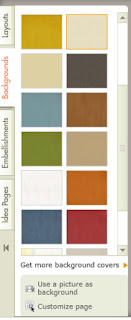
Olive Tree Genealogy Blog - Shutterfly Book Backgrounds
Backgrounds for my book theme
Consistency is my downfall. On this project, which incorporates 5 volumes on one family (McGinnis) I knew I could easily slip into a freer less-consistent method of organizing the books. It was important to me that each volume had the same look and feel, so I created a plan on paper ahead of time.

My plan listed what fonts and text colours I wanted to use. I chose one book style (theme) to use for each volume.  I listed my method of organizing within each book - parents, then child who was my direct ancestor, then siblings of direct ancestor.

As I began to create each volume, I listed what records I had, and what I should get if I didn't already have it. This included census records, vital statistics and so on. Then as I added those documents I ticked them off on my list.

This is the most organized I've ever been on a project and it helped me to finish two volumes very quickly.  The photo you see above is the volume for my great-grandparent Alex McGinnis and I'm almost finished! The volume for my dad has been ordered. The volume for my grandfather is done but not ordered.  I'm amazed at how quickly these are coming together, and very excited to carry on with other family surnames.


July 20, 2011

Shutterfly - I'm Loving it!

My Photo Book Cover
Yesterday a package arrived in the mail. It was the photo book I created using Shutterfly, an online self-publishing service.

This particular photo book is a 43 page 8x8 soft cover featuring one of my sons from birth to adulthood.  It looks great!

Readers might remember that I've also used Lulu and wrote about my experiences with that self-publishing site in a previous post.

I have to say that I prefer Shutterfly. The user interface is easy to use. The templates are very nice and there are many choices.

 You start your photo book by choosing Custom Path or Simple Path.


Custom Path has more choices and you can have more photos on each page  but it is a bit more complicated. Uploading your photos is not quite as easy on Custom Path as on Simple Path.

I actually created two photo books, one using Simple Path, the other using Custom Path. Here's a little comparison chart to show some of uthe differences:

Custom Path
*1-25 photos per page
*max 1000 photos
*5 sizes of books
*priced from $12.99
*multiple text boxes per page
*lots of choice of layouts, fonts, backgrounds etc
*spell check
*stickers, word art, etc
*use own photo as background
*many font choices including colour, style etc
*upload photos via Shutterfly account, Your
computer, Share sites or Facebook
Simple Path
*1-4 photos per page
*max 400 photos
*5 sizes of books
*priced from $12.99
*one caption per page
*established layouts
*no spell check
*no stickers, word art
*can't use own photo as background
*standard fonts
*upload photos via Shutterfly account, Your
computer, Share sites,  Facebook or Picasa

I liked both methods - Simple and Custom Path but I preferred the creative control and options I had with Custom Path. The only drawback to Custom Path for me was that I couldn't use PIcasa to upload my photos. Using it made things fast and easy. But I found a way around that restriction by creating a Shutterfly account and using Picasa to upload my photos before choosing my book template.

Inside page of photo book
Creating my photo books was a snap. The first time I let Shutterfly insert the photos where it wanted and automatically create a book for me. Then I just moved photos around as I wanted. That proved a bit tedious so next time I had Shutterfly upload my photos but not do any arranging on my behalf. I found that much easier and less confusing as I could see all my photos in my photo tray.

When I used Custom Path I had fun switching backgrounds and themes until I found the one I liked best.  All in all it was a simple matter to insert photos, write some descriptive text for each one and then publish my books. I'll definitely choose Shutterfly over Lulu for my next photo book projects.

Christmas isn't that far away and I'm excited about creating some amazing photo books for my family.

Disclaimer: Shutterfly did not ask me to write this review, nor did I receive any compensation for writing it.