Discover your inside story with AncestryDNA®

January 18, 2011

Finding an Ancestor in Belgium Part 1: The Flemish Records

A few days ago I talked briefly about Belgium research on my Ask Olive Tree blog. Several readers responded with more questions, so I thought I would elaborate in a series of blog posts.

My husband has Belgium ancestors, starting with his great-grandfather Archie De Meuleneare who was born in Tielt Belgium on 29 March 1884. Several years ago we took a research trip to Salt Lake City Family History Library with the goal of researching this line. It proved to be a very educational and challenging adventure! We very quickly learned that Belgium had two areas - Flemish and Walloon. Thankfully we knew Archie had been born in Tielt so it was an easy matter to check a map to find out that we needed to look in West Flanders records.

We started our research, checking first for Archie's birth in the microfilmed records for Tielt. The records are very complete, there are hundreds of microfilm reels of Civil Registrations, Parish Records and so on. But they are in a variety of languages, depending on the time period and the location! Some are in Flemish, some Dutch, some Latin and some French. We did not know this when we began our research but believe me, we quickly discovered it.

We stuck with Civil Registrations and Parish Records because of the language barrier. I erroneously thought the Church Records and Civil Records would be in Dutch (which I am familiar with due to my research for my New Netherland Series of books) but I was wrong. Luckily I can read basic church records in Dutch, French, Latin (and of course English). I cannot read any of them well enough to understand records that don't have standard phrases. So we thought we were good to go!

We found Archie's birth record in the Registers van de Burgerlijke Stand, 1795-1900 which has been microfilmed on several reels. These are the Civil Registrations for Births, Marriages & Deaths (Geboorten, huwelijken and overlijdens) in Tielt. The records are written in Flemish and French. When I saw that description I crossed my fingers that Archie's would be in French, the language I am most comfortable reading. I've never seen Flemish so had no idea if I could understand anything other than a name.

Archie's record was in Flemish but poring over it I realized it was very similiar to Dutch! I could understand some of the common phrases and words used in the record. Archie's birth registration was a complete surprise, since we had no idea his given name was Achilles. We had to phone my husband's grandmother to ask her to verify that we had the right man before we accepted that we had the correct record (even though the date of birth was correct and we knew his father's name was Henri).

As an aside, it took us some time to figure out why a man named Achilles would end up with the name Archie after arriving in Canada. My French sister-in-law explained that Achilles is pronounced as "Aw-shee" which of course sounds like Archie to our English ears!

Poring over the record we spotted the names of his parents quite easily - his father was Henry and his name was larger and bold so easy to pick out. It was a challenge to read but with a bit of time and the help of my Dutch-English dictionary I had it figured out.

Father Henry De Meulenaere was "een en vertig jaer" (41 years old) and "geboren Canegham" (born in Kanegem)

His mother's name was not bolded or large, but it wasn't hard to spot - Maria Rosalia Blondeel. The record gave her age "dry en dertig jaer" (33 years old) and where she was born "geboren Pitthem" (born in Pittem)

We were ready to move on. Our plan for our next step was to hunt for three items - the marriage of Henry and Maria Rosalia, and the birth records of both. Fingers were crossed that birth records of Archie's parents would be as detailed as Archie's and provide us with ages and places of birth of his parents.

I'll talk about looking for, and finding those three records in my next Belgium Research blog post.

January 17, 2011

Ada Harland's Diary England 1914: Jan 17

Jan 17, 1914


Saturday. Noon in bed. Then shopping. Aft. and evening stayed in and worked. J. has a bad cold

Why Take an IPad instead of a Laptop on a Research Trip?

On January 10 I wrote a review of the wireless keyboard versus the keyboard dock for the iPad. Becky left a comment that has includes a great question which I want to address today.

Here is Becky's comment:
I'm not as familiar with these new tools but I'm wondering what the advantage is for using your current set-up that you're written about here (even at RootsTech) over simply using a laptop on your lap on the sofa or at RootsTech? I don't have a netbook either, but that would be very portable. Can you explain the advantages of this iPad with the wireless keyboard setup? I'm just trying to learn.
Thanks for the good (and important) question Becky. My choices might not be the choices that are best for others but they work well for me. I have physical challenges and use a cane so anything extra that I need to carry has to be thought about carefully. But I think the awkardness of a laptop in terms of size and weight will hold true for most travellers.

My HP Laptop
First - size. It does matter. My laptop is not  a small notebook. It's big, heavy and awkward compared to my iPad. Resting it on my lap is uncomfortable and painful after an hour or more.


Laptop dimensions in inches: 12x11x2
iPad in case: 10x8x1/2

Laptop weight: 5 1/2 lb.
iPad out of case weight: 1.6 lb. The case is not heavy so not much weight is added

My Laptop
beside standard business envelope
The laptop has to go in a padded laptop case, which then goes on a wheeled laptop cart. It is awkard to drag it through the airport or around in a research library. It is awkward to take off the cart, open the case, remove the laptop, open it and place it so the customs officials can inspect it in the airport. It is difficult to get it in the airplane overhead bins and try to get the cart into the bin too before the attendants snatch it away to put elsewhere.


Ipad in case (sorry it's dirty!)
beside standard business envelope

My iPad slips into my large purse. I can remove it easily, open the case and let customs officials inspect it quickly. I can carry it without difficulty even with my cane.

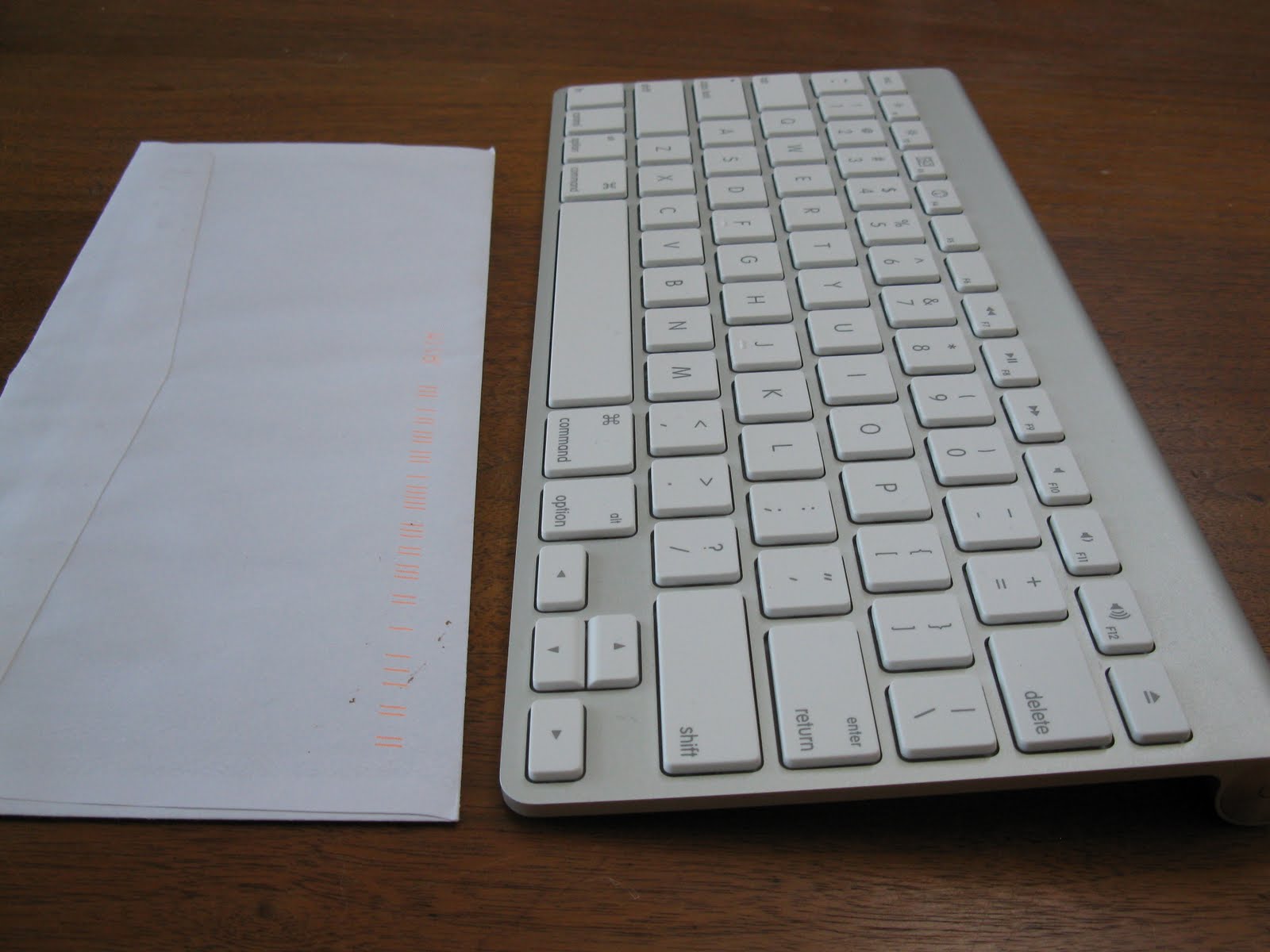
Wireless Keyboard
beside standard business envelope
With the iPad I opted for an external keyboard which adds to size and weight. But the wireless keyboard is very small  - 11x5x less than 1/4 of an inch! And it weighs about 10 oz. So tucking it into a cloth bag and then into my oversize purse is easy.  


That means I don't have to listen to my husband grumble about having to push a laptop around as well as manage his own luggage, and no muttering under his breath as he tries to get the laptop into the overhead compartment of the plane while other passengers push by. I also forgot to mention that we have to make a minimum of one change, sometimes two, on our way by air from our home to Salt Lake City. So we double or triple the frustration of that cumbersome laptop.

I hope this helps explain why I am convinced that taking an iPad makes more sense (for me) than taking a laptop on a research trip. However since I bought a MacBook Air last week, I'm starting to rethink taking my iPad in favour of taking my new MacBook Air! I'll write about that once I make my final decision.

Interview with RootsTech Presenter AC Ivory

Today's interview is with A. C. Ivory who is one of the RootsTech presenters. A.C.'s Session is Mobile Apps for Genealogy and it's being given on Thursday Feb. 11

I asked A.C. to introduce himself but he modestly did not tell us about his wonderful blog Find My Ancestor
My name is A.C. Ivory. I am 23 years old and live in Taylorsville, Utah. I have been doing genealogy for a little over four years. I gained my interest in genealogy right before I left on an LDS mission to Calgary, Canada. While serving my mission I helped many people who were just starting their genealogy research. The past two years I have strengthened my education in genealogical research through blogs, podcasts, social networking, college classes, email lists and personal experience. I specialize in using technology, social networking and Mac Genealogy to help others learn more about tracing their roots.

I have always been intrigued with technology and have enjoyed learning how to use it for various tasks at home and school. When I was 14 I bought my first Palm Pilot because I thought the concept of having a mobile computer that I could install applications on was so impressive. Back in the day, those simple Palm Pilots were extremely advanced even though their functionality was quite limited. Over the years I have enjoyed seeing the rapid advance in mobile devices.

When I first got an iPod Touch I was amazed at the amount of web apps you could used to play games, surf the Internet, check your banking account and more. Then, Apple introduced the App Store and an explosion of apps emerged. Within months there were thousands of apps you could download and do almost anything imaginable on your little device. Soon, I found there genealogy apps creeping into the App Store as well as other apps that weren't specifically meant for genealogy but I found ways to incorporate them into my genealogical research.
I asked A.C. to tell us a bit more about his Session (without giving away the entire Session of course!) It's one of the Sessions I was able to sign up for, so I am naturally curious about what is going to be covered.
My session, Mobile Apps for Genealogy, will include a number of different apps available on the iPhone, iPod Touch, iPad and Android devices. Some of these apps are genealogy specific, allowing you to create family trees, access online databases, learn how to do genealogy and share with with your friends and family. Other apps that I will be demonstrating aren't used by most people for genealogy purposes, but I will show how they can be used to help you stay organized, network with other genealogists and find new and innovative ways to become a technological genealogist.
This sounds great and I wondered what prior knowledge someone planning to attend would need
Anyone can attend Mobile Apps for Genealogy without feeling overwhelmed or the need to have a ton of technology skills. For anyone who has ever used an iPhone or like device, you know how easy and user friendly they are. All of the apps I will be demonstrating are just as easy to use as the Apple or Android operating systems. I hope that those who are thinking about getting one of these devices will attend to learn how easy and fun going your genealogy on a mobile device can be.

I also wondered what A.C. hope an attendee would take with them after leaving his session.

I hope that those who attend my session will leave with more understanding and insight on how they can use their mobile device for more than just making a phone call or texting. I want people, even the older generations, to feel like they can use these mobile devices and not be afraid to use them. With the development of the thousands of apps we will continue to see more being developed specifically for genealogy as well as those that we can incorporate into our research.

Of course I couldn't end the interview without asking my favourite question. I'm always excited to see the answers - What exciting developments do you foresee in the future for mobile apps?

I honestly believe that the invention of the iPhone, iPad and Android devices will help genealogy go where no one could have ever imagined - not even 15 years go. My grandpa has even told me that he could never have even dreamed of using something like my iPad back in the early 1980's when he was heavily involved with genealogy.

I think that as smart phones and mobile tablets grow in popularity there will be more software developers who are wanting their genealogy database programs available to their users on their mobile devices.

Genealogists who travel to archives and libraries are starting to take their mobile devices with them rather than their laptops because of the size and weight. It is much easier for someone to slip their iPad into their bag and take it with them then trying to gather all the cords, mice, batteries, etc. that you do with your computer. The more database apps available on their mobile device the more people you will see using them while doing their research.

One of my favorite features about using my iPad is the ability to have genealogy books, software, pictures, movies and many other files all on one device. I don't need to worry about carrying heavy books along with my laptop everywhere I go. I can easily switch from reading Evidence Explained to adding a source citation with a few swipes of my finger.

January 16, 2011

Ada Harland's Diary England 1914: Jan. 16

Jan. 16, 1914

Friday. 6:30. Letter from J. Evening dancing class. Had a fine time. Later to Miss T. Meny.... [can't read] set with [can't read]

January 15, 2011

Ada Harland's Diary England 1914: Jan 15

Jan. 15, 1914

Thursday. Evening stayed in. Worked at lessons. Letter from T.K.H.

Shoemaker's Ledger, Lunenburg Nova Scotia

Entries Jan. 9-15, 1897-1919


Several years ago I purchased an account book kept by a local shoemaker living in or near the communities of CrossCreek and Ritsey's Cove, Lunenburg Nova Scotia. There are no identifying notations to tell me who the shoemaker was, so I researched the names of his customers found in the book. I found them all living in CrossCreek and Ritsey's Cove so I assume the shoemaker lived nearby.

The entries I read date from 1897 to 1919. There may be some earlier or later - they are not in date order. Whoever kept the account book decided to keep track of money owed and paid by family. Each family has its own page (or pages) and shoe repairs and purchases are noted throughout the years the family used the service.

The shoemaker's ledger book is 17x7 inches and there are 212 pages covering 22 years. Continuing on with Jan. 9-15 entries, all years:


Jan-09 1897 Daniel Zink of Lewis pair boots repaired - Flossie 10 c


Jan-11 1897 David Conrad Pair boots repaired - Thom 70 c

Jan-12 1897 David Conrad Pair boots soled, healed 75 c

Jan-14 1897 David Conrad Pair boots soled, healed 70 c

Jan-12 1898 Wille Conrad pair boots soled patched 70c

Jan-14 1898 Daniel Himmelman pair boots - Albert $1.75

Jan-15 1898 Freeman Zink pair boots soled healed 75c

Jan-09 1900 Daniel Zink of Lewis 1 shoe repaired - Mrs. 10 c

Jan-09 1900 Daniel Zink of Lewis pair shoes - Flossie $1.75

Jan-09 1900 David Conrad pair boots soled healed 75c

Jan-09 1900 David Conrad pair shoes soled healed 70c

Jan-09 1900 David Conrad pair soled 60c

Jan-09 1900 Willie Risser Jr pair shoes soled healed 75c

Jan-11 1900 David Conrad pair shoes soled - Mrs. 40c

Jan-12 1900 Eldredge Conrad pair boots patched 15c

Jan-12 1900 John Knock pair boots $5.50

Jan-12 1900 Willie Risser Jr Pair shoes soled healed 70c

Jan-11 1901 Daniel Zink of Lewis pair shoes repaired - Mrs. 15c

Jan-12 1901 James Risser pair boots soled healed 75c

Jan-09 1909 Mrs. Daniel Zinck pair boots soled healed - Eva 50c

Jan-14 1909 Israel Ritcey 1 boot patched 10 c

Jan-15 1909 Edward Creeser 1 boot patched - Leone 10c

Jan-11 1910 Solomon Creeser pair shoes repaired - Carl 70c

Jan-12 1910 Israel Ritcey pair boots soled healed 50c

Jan-12 1910 Samuel Ritcey pair boots soled healed - Mrs. 45c

Jan-09 1911 Daniel Zinck of John pair shoes soled healed - Lailie [?] 40c

Jan-09 1911 Wilbert Wentzel pair of rubbers heeled for Grace 35cents

Jan-10 1911 Mrs. Obadiah Deal 1 boot patched - Mrs. 10c

Jan-12 1911 Solomon Creeser pair rubbers soled healed - Clara 25c

Jan-15 1911 Archibald Conrad pair shoes repaired - girl 20c

Jan-11 1912 Edward Creaser Est pair of shoes repaired for Ethel $.15

Jan-12 1912 Ambros Creeser Putting on Skates - Roy 10c

Jan-12 1912 Sidnam Smith hair cut 15c

Jan-15 1912 Freeman Creeser pair shoes patched - girl 30c

Jan-15 1912 Isiah Wentzel pair shoes soled healed - George 30c

Jan-15 1912 Willet Creaser pair of boots soled heeled one dollar

Jan-09 1913 Benjiman Wentzel pair rubbers healed - Vinnie 20c

Jan-11 1913 Benjiman Wentzel pair shoes healed - Sadie 10c

Jan-15 1913 Benjiman Wentzel putting on 2 pair hokkey [sic] skates 20c

Jan-15 1913 Ellen Conrad pair shoes soled healed 50c

Jan-10 1914 Daniel Ritcey pair shoes soled healed - Vera 60c

Jan-10 1914 Freeman Creeser 1 shoe repaired - July 10c

Jan-10 1914 Solomon Creaser pair shoes soled heeled - Carl 75c

Jan-10 1914 William Woolf pair shoes repaired - Merlean 20c

Jan-14 1914 Daniel Lohnes 1 rubber repaired - Dora 10c

Jan-11 1915 Seamore Ritcey pair soled heeled - Joie 60c

Jan-15 1915 Edward Creaser Est 1 shoe heeled - Ethel 10c

Jan-10 1916 Isiah Conrad pair of shoes soled and heeled $.45

Jan-15 1916 John Smith pair shoes soled heeled - Murry 60c

Jan-15 1916 Solomon Creaser pair shoes heeled - Clara 15c

Jan-09 1917 Daniel Ritcey pair shoes soled heeled - Ida 65c

Jan-09 1917 Reuben Ritcey 1 shoe repaired 10c

Jan-10 1917 Edward Creaser Est pair shoes soled heeled - Ethel 65c

Jan-11 1917 John Smith pair rubber heels 50c

Jan-11 1918 Reuben Ritcey 1 rubber patched - Malkam [sic probably Malcolm] 10 c

Jan-14 1918 Daniel Ritcey pair shoes soled heeled - Ida 75c

January 14, 2011

Ada Harland's Diary England 1914: Jan. 14

Jan. 14, 1914 Wednesday

Evening. Sch. [School] of Art. J. waiting for me - the dear fellow. Took me for a walk up Stepney. Ripping

New Immigration records on Ancestry.com

Ancestry.com has added new immigration records. They include the following for Hawaii and Miami

Honolulu, Hawaii, Passenger Lists, 1900-1953

This index of passenger arrivals in Honolulu contains passenger's name, citizenship, age, and gender; date and ship of arrival at Honolulu; and the related "book" (volume), "list" (page), and line upon which the passenger's arrival is recorded.
 
Index to Alien Arrivals by Airplane at Miami, Florida, 1930-1942

The manifests in this collection record details on aliens who arrived as air passengers in Miami Florida.

January 13, 2011

Ada Harland's Diary England 1914: Jan. 13

Jan. 13, 1914. Tuesday

Meeting after Cafe. School. Evening gym class. very jolly. Went and came back with Win.

Interview with Schelly Talalay Dardashti, Presenter at RootsTech

We have an exciting interview today with Schelly Talalay Dardashti, one of the presenters at the upcoming RootsTech Conference in February.

Schelly focuses on Jewish genealogy as a journalist, blogger, online instructor and speaker. Her blog Tracing the Tribe: The Jewish Genealogy Blog  is the top-ranked, award winning blog in this niche.

Schelly's Session at RootsTech is on Friday Feb. 11 at 9:45 am. The title is It's in Our Genes: Revealing History via Technology (A DNA Project Case Study)

Schelly kindly agreed to me interviewing her about this upcoming session. Her responses not only provide a clear understanding of what her session will cover, I am sure you will find, as I did, that you have a better understanding of the use of DNA in Genealogy.

Following are my questions and Schelly's answers.

*Q: What is your background or interest in the topic you are presenting?

I grew up in an Eastern European Ashkenazi family that had been in Mogilev, Belarus since the 1700s. However, the family story was that “Talalay was our name in Spain” and that we were Sephardic Jews. No one in the family believed it, everyone laughed at the idea, but it was faithfully passed down to each generation.


Over the years, I’ve heard the same story from many researchers. But because of the time gap and the tragedies of Jewish history, paper trails were impossible to follow back to the 15th century of earlier.


Several years ago, after FamilyTreeDNA.com was formed, Judy Simon and I met at one of the annual international Jewish genealogy conferences. Judy’s family story was similar, “We were marranos in Spain.” Marrano is a derogatory, pejorative term for Jews forcibly converted to Christianity during the Spanish Inquisition.


We knew there were more of us and we thought that setting up a DNA project at FTDNA would help confirm these stories. The rest is history. With more than 200 participants, we have now connected more than 75% of our Eastern European Ashkenazi families with confirmed Sephardic, Hispanic, Latino and Converso families (whether they knew of Jewish roots or not). There are other advantages to making these connections, covering medical conditions and other reasons.


The matches for Judy’s family and my own show genetic matches to Sephardic and Hispanic families, and we’ve followed up with traditional research in Spain. I will demonstrate these documents during the session.

*Q:  Can you elaborate a bit on your Session Title to help us understand what will be covered?
Using the IberianAshkenaz DNA Project at FTDNA, we show that we can confirm ancestral family stories, showing that our history is in our genes. While paper trails have disappeared and historical tragedies have intervened, we can still establish the connections of families and reveal their history.

Although the session focuses on Jewish history and families, similar studies can be formulated for other ethnic groups.

I will cover organizing a project, criteria for joining, how to encourage people to participate, the surprises revealed and fascinating connections.

*Q:  Does an attendee need any prior knowledge of the subject? What level of attendee is your topic geared to?

I’m not going to get into the complex biology of why genetic genealogy works – that’s a topic for its own session. I will explain the very basics of male Y-DNA and female mtDNA, the tests available for each and why they work the way they do, but will try to focus on the possibilities and results that can be achieved. I believe it is a good session for all levels as it demonstrates what genetic genealogy can reveal about our individual ancestries. Those who haven’t yet used DNA may understand how useful it can be, while those just beginning to consider it will learn more about what can be revealed.

*Q:  What do you hope those of us attending will take with them after leaving your session?

I hope that participants will carry with them an understanding of why genetic genealogy is exciting, how it can provide answers and solve problems, while also furthering family history research. I’m hoping attendees will understand that genetic genealogy is not paternity or forensic-focused, as some fear.

*Q: What exciting developments do you foresee in the future for DNA testing?

New tests and features are constantly being developed.


FTDNA, as the pioneer in the field, is on the cutting edge of the industry. Newer tests already can find individuals to whom you are related going back five or six generations, which may offer additional insight into family relationships.


As databases grow, more connections will be made possible. Surname and country projects grow in number at FamilyTreeDNA; and some researchers use community-based projects to link descendants of families from certain areas or town, adding to our understanding of ancestral connections.

*Q:  Is DNA testing useful for everyone (all genealogists) or only for individuals with research challenges they have not been able to conquer?

While some genealogists believe genetic genealogy is too complicated for beginners, many of us who work with these tools believe everyone should test right from the beginning. It will show historical connections from the beginning and beginners may be able to connect with those who have already done extensive research. Testing is also altruistic and adds more samples to the database, meaning that more connections can be made with larger databases.

As most researchers know, paper records may demonstrate mistakes in old and even contemporary documents. Whiled documents may have errors, blood doesn’t lie. A paper trail may not be clear, but a match at 12, 37 or 67 (or more in the future) markers shows that two individuals are indeed related. The more markers tested that match, the closer the time of the Most Recent Common Ancestor shared by two individuals and the closer the connection.

Once a genetic connection is made, a researcher can then continue to explore traditional genealogical methods and resources and find out how, when and where the relationship may be traditionally be documented.

*Q: Different companies have different DNA tests. How is an individual to decide which company and which test is best for their needs?

My first criterion is to test with the largest database available, which is found at FamilyTreeDNA, which has the largest number of YDNA and mtDNA samples. That means that a testee is more likely to find a genetic connection. Testing against a smaller database means results may be limited or non-existent. The majority of genealogists who use genetic genealogy utilize FTDNA for that reason. While it has the largest Jewish database, it also includes very large genetic databases for other ethnicities. It all adds up to the largest database to test against.

An inexpensive test with a smaller company may be wasted money as the database is too small to produce results.

The basic test is the relatively (pun intended) low-price 12 markers, basically a screening test. If two people do not match at 12 markers, they won’t match at a larger number of markers. Once one finds a match, it is recommended that the test be upgraded to more markers and see if the matching continues. That’s why some people just go for the larger-marker tests from the beginning.


The basic point to be made is that many people today do not know who they are. Families have been caught up in historic events throughout history. Often that history is unknown due to circumstances and then not communicated through the generations. Genetic genealogy helps us understand who we are.


The caveat is that people who utilize this amazing tool must keep an open mind as the results may be quite surprising (and I will cover this in my talk) or challenging to a person’s self-identity. Some people may disbelieve the results, while others immediately relate to what the results mean.

January 12, 2011

Ada Harland's Diary England 1914: Jan. 12

Jan. 12, 1914 Monday.

Evening - School of Art. Jack waiting outside for me. Brought me home. Little class girl L Allison dead

Ready, Set, Go!

Several years ago I wrote about planning ahead for a research trip to Salt Lake City Family History Library.  I haven’t been back in 5 years but am heading there in February as an Official RootsTech Blogger. Although I’ll be busy at the Conference, I’ve got 3 days beforehand to do my own personal research at the Library. Things change - technology advances, the Library rearranges items and makes new purchases - and that means it is time to work out a new plan.
  1. I need to organize my genealogy and decide what individuals or families I will concentrate my research time on. Part of this organization is making sure details are entered in my Family Tree Maker 2011 genealogy program on whatever device I am taking with me. Gone are the days of lugging around binders and cases full of paper notes and charts.
  2. Decide what device I am taking for my files and continued note-taking of research finds. At this time I’m torn between my iPad where I use an App called GedView, or my MacBook Air where I use Family Tree Maker for Mac I’m leaning towards the MacBook Air simply because it has the genealogy program I’m most comfortable with. I need a way to quickly look up, and add, facts and details.
  3. Make sure I have extra batteries for my Flip-Pal Scanner. (Read about how much I love this scanner) I don’t know if it’s going to work for me but I’m taking it with me. I hope it will scan records I view on microfilm as they are projected on the viewing surface of the microfilm reader. It will definitely save me from lining up at the photocopiers to copy records I find in books!
  4. Consult the online FamilySearch Catalogue for records (films, books) I want to consult. If I make a list now, it will save me hours of time once at the Library in Salt Lake City. Most microfilm is self-serve so if I have my list of numbers I can quickly go to the drawers and grab the first set of three films I need. 
  5. If I had not done this already, I would be booking my hotel now. You have many choices and will need to decide what is most important to you - proximity to the FHL, or cost, or a preferred hotel chain. This year I am staying at a hotel that I’ve never used before so I’ll be sure to let you know later in February how that worked out. 
  6. You will need a research bag to carry your devices and other necessary items. I like to have pens, pencils, markers, notebook or pad of paper, coloured paper for making hard-to-read microfilm more legible, kleenex (tissues), lozenges for dry throat, Tylenol  for headaches after staring at microfilm for hours on end, a few bandaids just in case, gum and a magnifying glass. I also toss in a small ziplock bag of coins in case I need to purchase a Copy Card although I can’t see me needing one this time.
  7. I am going to have to figure out a way of keeping my iPad (if I take it) and my MacBook Air safe. I can try to make sure I carry them with me at all times but I like backup plans so am going to think about a way to lock them up securely. Things do get stolen and you cannot leave such items lying on your microfilm reader table or at a table in the Library.
  8. Make sure I have padded cases to protect each of my devices. Yes they will be in a research or computer carry bag but they need to be protected on their own.
  9. Pack extra batteries, chargers, cables and whatever else might be needed with my devices - iPhone, iPad, Flip-Pal Scanner and MacBook Air. 
  10. Today I am going to see if my Magic Jack will plug into and work on my MacBook. If it does I will also take that plus a small portable phone so that I can call friends and family for free and they can call me for no more than it would have cost them to phone me at my home. 
That is my 10 point checklist for my planned trip to Salt Lake City. It’s all about efficiency and saving my limited time for the actual research! Fingers crossed that I have not forgotten anything.

January 11, 2011

January 10, 2011

Review: Wireless Keyboard for iPad

For Christmas, I asked Santa for the iPad Keyboard Dock. I was finding the iPad internal keyboard is a bit awkward for extended typing. It was fine for brief emails or tweets, but not for writing blog posts or lengthy emails.

Seting up my new keyboard was super easy. It combines a dock for charging your iPad with a full-size keyboard, which includes special keys that activate iPad features. I just wanted to type with it so didn't play with the other features. After two weeks I realized it isn't what I want.

I can't hold my iPad on my lap when it is in the dock, as it is too awkward and the iPad is at the wrong angle for me to see the screen. Putting it on my coffee table worked well except I had to lean forward and down to type which proved very uncomfortable after a short time.

As well, I found it extremely tedious to remove my iPad cover every time I wanted to use the keyboard! The iPad only fits in the dock when it's "naked". So I had to take the cover off, put the cover back on, take it off, put it on.. you get the picture.

Sure I could put it at the dining room table but if I'm going to do that, i might as well use my main computer at my desk! I want to sit on the couch and work from there.

Also I soon realized that the keyboard was not very portable with it's big extension dock on the back. And I need to take it to Salt Lake City when I am at RootsTech, since I'm one of the officlal RootsTech Bloggers.

Originally I wanted the wireless keyboard for the iPad but I misunderstood the description on the Apple website! Under "Minimum System Requirements" it says it requires a  "Bluetooth-enabled Mac computer with Mac OS X v10.5.8 or later" I thought that meant I had to have a stand alone Mac computer for the initial set up. Wrong.

The wireless keyboard works on Bluetooth technology and is as simple to pair with your iPad as it was to pair up my new Jambox with my iPad (more on that little delight in another blog post!)

I purchased the wireless keyboard and am loving it. It was easy to pair with my iPad by going into Settings, then General, then selecting Bluetooth. It automatically found the keyboard.

It is super easy to use. I can sit the keyboard on my lap and the iPad on my coffee table (propped up in its case) and type away.

I kind of wish I'd bought the folding wireless keyboard but if I tell hubby I am buying a third keyboard I think I'll hear about my bad decision-making for quite some time... and I do like this one.

It is going to work for portability and that's a huge plus!

I do need a sturdier dock of some kind to hold the iPad a bit steadier and at a slightly different angle, but I'll hunt around for something suitable. I would also like to have the iPad in landscape position instead of profile, but the angle is wrong when it's in my case and on the coffee table. 

It is much easier to type on the external keyboard. I recommend it.


I'm giving the wireless keyboard 4 out of 5 Olive Tree Genealogy family trees, and the keyboard dock gets 3.

Ada Harland's Diary England 1914: Jan. 10

Jan. 10, 1914. Saturday.

Noon - in bed. Aft. shopping. Letters from PO? to J. in morning. Met Jack letter [should be later?]. xxx. Wet night. Went to Palladium

January 9, 2011

Ada Harland's Diary England 1914: Jan. 9

Jan. 9, 1914. Friday

School. Went to Mr Fetley's dance. He put my boots on. Then cycled to Cloaghton Dance. Left bikes at Mr. Vollum's. Had a good time.

January 8, 2011

Ada Harland's Diary England 1914: Jan. 8

Jan. 8, 1914. Thursday.

School. Evening prep for Folly night's dance. Wrote to Miss Vollum

Shoemaker's Ledger, Lunenburg Nova Scotia

Entries Jan 1-8, 1897-1919

Several years ago I purchased an account book kept by a local shoemaker living in or near the communities of CrossCreek and Ritsey's Cove, Lunenburg Nova Scotia. There are no identifying notations to tell me who the shoemaker was, so I researched the names of his customers found in the book. I found them all living in CrossCreek and Ritsey's Cove so I assume the shoemaker lived nearby.

The entries I read date from 1897 to 1919. There may be some earlier or later - they are not in date order. Whoever kept the account book decided to keep track of money owed and paid by family. Each family has its own page (or pages) and shoe repairs and purchases are noted throughout the years the family used the service.

The shoemaker's ledger book is 17x7 inches and there are 212 pages covering 22 years. For the month of January, all years, I extracted 284 entries.

This begins January with Jan. 1-8th entries, all years:

Jan-07 1897 James Risser 1 boot soled healed for Alton 25c

Jan-08 1897 Daniel Zink of James pair shoes soled healed 75 cents

Jan-08 1897 Daniel Zink of Lewis pair boots soled healed 75 cents

Jan-08 1898 Daniel Zink of James pair shoes patched - Mrs 10c

Jan-08 1898 Willie Conrad pair boots soled healed 75c

Jan-08 1898 Chemanna Winter's pair boots repaired - Stella 40 c

Jan-08 1898 Reuben Smith pair boots - Maggie $1.75

Jan-07 1899 Daniel Zink of Lewis 1 boot repaired for Charlie 20c

Jan-08 1899 John Whinter's pair boots repaired 55c

Jan-08 1900 Daniel Zink of John pair shoes soled -Mrs. 35c

Jan-08 1900 Daniel Zink of Lewis pair shoes soled healed patched 80c

Jan-08 1901 Daniel Zink of John pair boots soled patched 75c

Jan-08 1901 James Risser 1 boot repaired - Alton 30 c

Jan-07 1910 Elex Smith pair shoes soled healed - girl 40c

Jan-07 1910 Henry Creeser, carpenter pair shoes soled healed 75c

Jan-07 1910 Solomon Creeser pair shoes soled healed - Mrs. 50c

Jan-08 1910 Israel Ritcey pair shoes soled -Gennie [sic] 40c

Jan-06 1911 Solomon Creeser shoe patched - Carl 15c

Jan-06 1912 John Smith pair shoes healed - Murry 15c

Jan-06 1913 Benjiman Wentzel pair boots soled healed 80c

Jan-06 1913 George Creaser pair shoes soled healed - Mrs. 75c

Jan-07 1913 Eli Mosher pair shoes soled healed - Harrold 75c

Jan-08 1913 Edward Creaser Est pair shoes soled healed - Birtie 60c

Jan-08 1913 Freeman Himmelman piece sole Leather 4 12/ lbs $1.35

Jan-06 1914 Samuel Ritcey repairing harness 15c

Jan-06 1914 Solomon Creaser pair shoes heeled - Mrs. 15c

Jan-07 1914 Charles Ritcey 1 shoe patched - Harry 10c

Jan-07 1914 Samuel Ritcey pair shoes soled heeled - Elsworth 90c

Jan-08 1915 Enas Smith pair shoes rubber heeled - Emly 40c

Jan-06 1916 Harry Godley pair shoes soled heeled - Alma 50c

Jan-06 1916 Harry Godley pair boots repaired - Kenneth $1.00

Jan-08 1916 Edward Creaser Est pair shoes repaired - Lewis 15c

Jan-06 1917 Hector Mossman pair shoes repaired $1.35

Jan-08 1917 Simon Walter Mrs pair shoes soled healed 70c

Jan-08 1918 Harry Godley pair shoes repaired - Alma 10c

Jan-08 1919 Howard Conrad pair boots soled heeled - Ralph $1.50

January 7, 2011

Ada Harland's Diary England 1914: Jan. 7

Jan. 7 1914. Wednesday

School. Evening wrote a/cs [accounts?] out for Father. Wet and stormy night!